Prescription Management Software
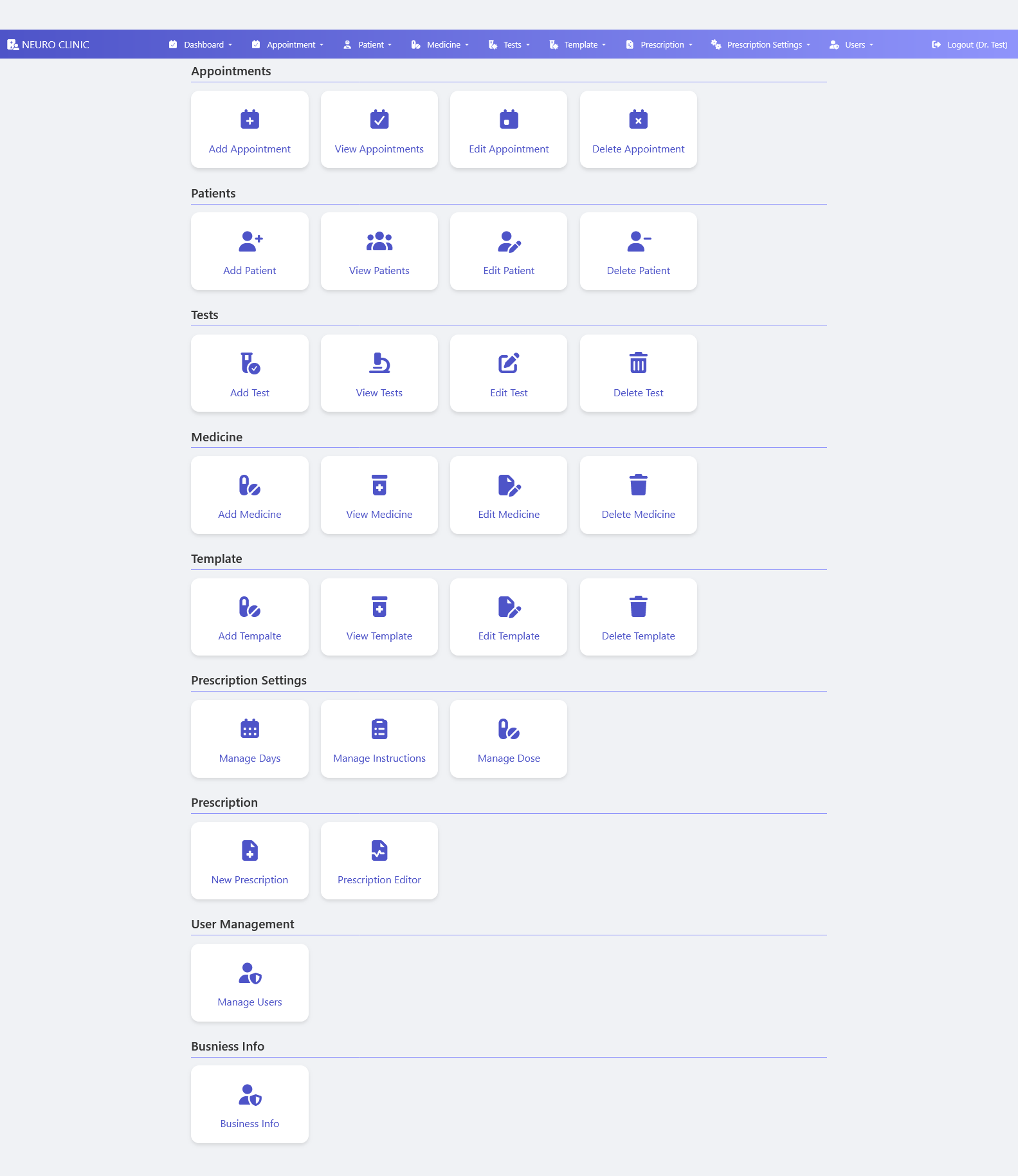
Prescription Software Dashboard Neuro Clinic Management system ka yeh primary administrative control workspace hai jo system setup, database entries configuration, aur clinical settings ko streamline karta hai.
Features
About This Software
Prescription Software Dashboard
Neuro Clinic Management system ka yeh primary administrative control workspace hai jo system setup, database entries configuration, aur clinical settings ko streamline karta hai. Yeh interface admin aur operators ko har individual core module (jaise Appointments, Patients, Tests, Medicines, Templates) ke database CRUD operations (Create, Read, Update, Delete) ko simple high-scannability grid cards ke zariye operate karne ki authorization provide karta hai.
Key Components
-
Top Global Navigation Header
-
Brand Identifier: Far-left par "NEURO CLINIC" ka customized brand logo indicator panel.
-
Dropdown Toolbar Utilities: System top menu links with icons for fast context switching: Dashboard, Appointment, Patient, Medicine, Tests, Template, Prescription, Prescription Settings, Users, aur right side par active user profile shortcut session "Logout (Dr. Test)".
-
-
Granular Functional Grid Layout (CRUD Matrix Sections)
-
Appointments Panel: Core booking scheduling workflows ko handle karne ke liye char major dynamic grid action paths: Add Appointment, View Appointments, Edit Appointment, aur Delete Appointment.
-
Patients Records Panel: Central patient files and demographic indexing registers control framework: Add Patient, View Patients, Edit Patient, aur Delete Patient.
-
Tests Configuration Grid: Diagnostic laboratories investigations catalog builder setups: Add Test, View Tests, Edit Test, aur Delete Test.
-
Medicine Catalog Block: Pharmacy stock tracking items definitions entry dashboard: Add Medicine, View Medicine, Edit Medicine, aur Delete Medicine.
-
Template Builder Management: Reusable clinical formats aur prescription structures automation engine: Add Template (spelled "Tempalte" in UI), View Template, Edit Template, aur Delete Template.
-
-
Advanced Clinical Customization & Configuration Blocks
-
Prescription Settings Block: In-depth prescription frequency controls parameters setup engine:
-
Manage Days: Treatment timeline duration limits configure karna.
-
Manage Instructions: Standard searchable medicine usage instructions database manage karna.
-
Manage Dose: Specific medication quantity measurements codes compile karna.
-
-
Prescription Processing Center: Active clinical workflows entry interface:
-
New Prescription: Fresh patient chart dynamic workspace trigger path.
-
Prescription Editor: Existing treatment notes and drug charts modification setup link.
-
-
-
Identity Management & Corporate Analytics
-
User Management System: Hospital administrative staff accounts creation, credentials setup, and role access validation via Manage Users utility card.
-
Business Info Section: Clinic settings adjustments panel containing Business Info card to control official clinic address formatting, logo prints setups, and billing invoice headers data.
-
Clinic Appointment Manager Module Description
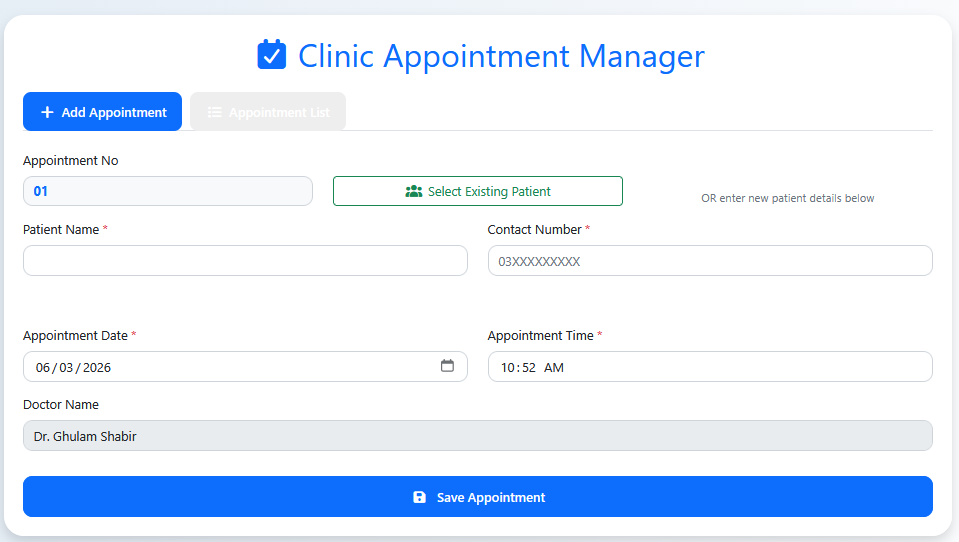
Clinic Appointment Manager module hospital aur private clinics ke front desk operations ke liye design kiya gaya hai, jo incoming bookings aur slots management ko automate karta hai. Is interface mein aik integrated dual-pipeline onboarding flow diya gaya hai, jahan user single click se existing patient base se profile link kar sakta hai ya phir same dashboard ko refresh kiye baghair instantly fresh patient scheduling fields run kar sakta hai.
Key Components
-
Workflow View Toggles & Dynamic Counters
-
Add Appointment Tab: System ka primary focus tab jo system configurations update aur dynamic routing handle karta hai.
-
Appointment List Tab: Secondary action link view jahan se complete existing bookings list aur historical slots check kiye ja sakte hain.
-
Appointment No Field: Auto-increment dynamic validation identification counter tracker (e.g., current sequence indicator showing "01").
-
-
Hybrid Patient Intake Processing Matrix
-
Select Existing Patient Button: Multi-channel database records lookup modal window open karne ka dedicated green button framework, jo pehle se saved profiles link karta hai.
-
New Patient Intake Fields: Soft conditional processing section containing required text areas:
-
Patient Name: Patient validation name identify karne ka required parameters text input container.
-
Contact Number: Pakistani mobile networks structure pattern placeholder (
03XXXXXXXXX) phone entries control karne ke liye.
-
-
-
Scheduling Time-Slots & Doctor Assignment
-
Appointment Date: Live date picker validation tracker setup field (e.g., active record capturing current system timestamp
06/03/2026). -
Appointment Time: Custom standard digital clock scheduler field to trace diagnostic appointment intervals (e.g., placeholder input showing
10:52 AM). -
Doctor Name: Fixed/Select pre-allocated profile visualization container tracking target specialist data logs (e.g., pre-filled setup displaying "Dr. Test").
-
-
Primary Form Submission Interface
-
Save Appointment Button: High-visibility, prominent full-width blue confirmation button handler engineered to lock the scheduling sequence, trigger dynamic token printing layout mechanisms, and instantly update doctor queue dashboards.
-
Patient Vitals & Demographic Manager Description
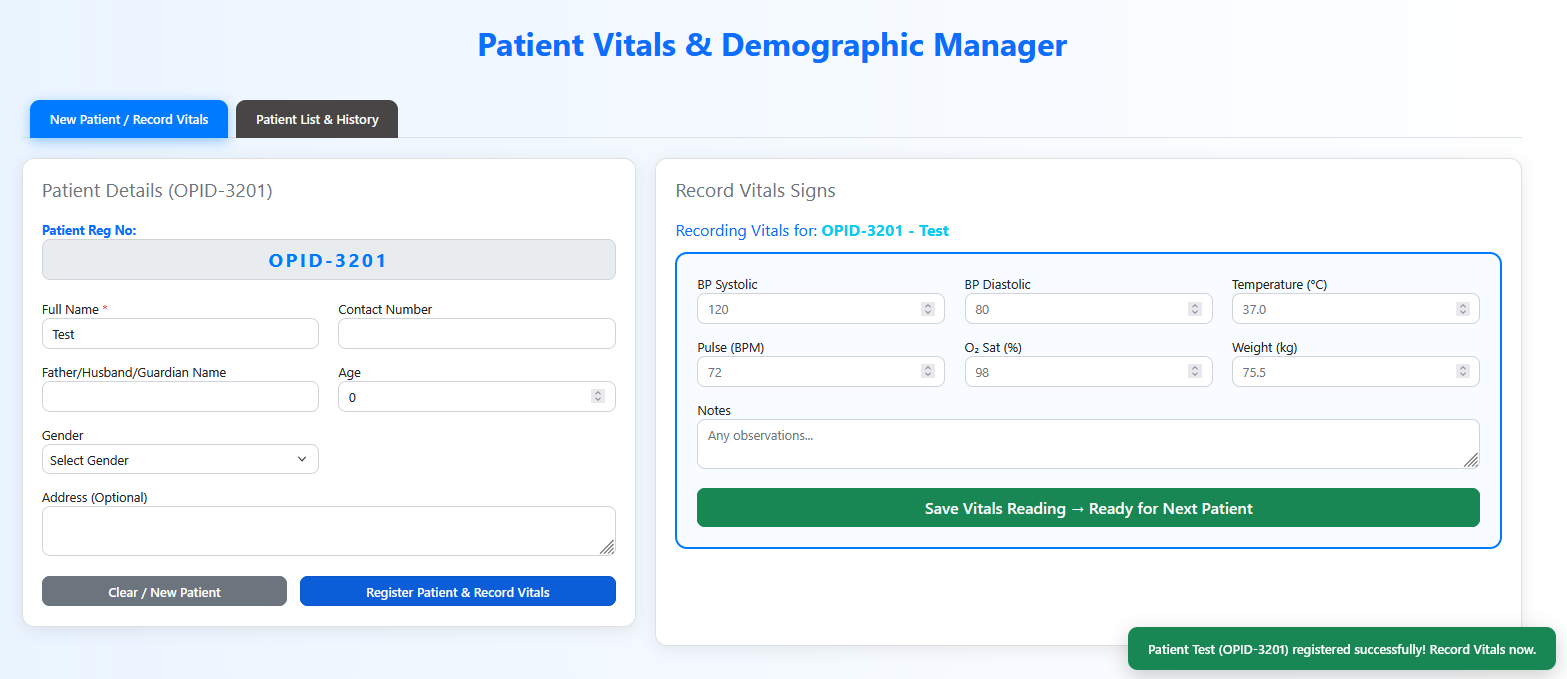
Patient Vitals & Demographic Manager module hospital triage aur initial check-in points ka aik crucial operational framework hai. Yeh system side-by-side design principles ko utilize karta hai taake incoming patient ki demographics record karne ke sath hi, simultaneous absolute vital signs signs ko lock kiya ja sake. Iska responsive workflow design patient intake timelines ko drastically reduce karta hai aur clinical precision ko streamline karta hai.
Key Components
-
Master Operational Toggles & Action Notification
-
View Tabs Group: Real-time components switching tabs: New Patient / Record Vitals (Active view) aur Patient List & History.
-
Dynamic Toaster Alert: Far-right bottom par high-visibility green validation pop-up banner tracking successful onboarding logs:
"Patient Test (OPID-3201) registered successfully! Record Vitals now."
-
-
Left Panel: Patient Details (Demographic Engine)
-
Patient Reg No Box: Automated unique serialization tag allocation panel (e.g., dynamic barcode value showing "OPID-3201").
-
Core Identification Inputs: Multi-field containers management including required Full Name (captured value: "Test"), Contact Number text area, Father/Husband/Guardian Name logger, counter-based Age spinner tracker, Gender selection dropdown, aur a multiline Address (Optional) text container.
-
Form Submission Core Handles: * Clear / New Patient Button: Form fields memory flush control tracking shortcut.
-
Register Patient & Record Vitals Button: Demographic tables lock run karne aur next vitals screen activate karne ka solid blue execution handle.
-
-
-
Right Panel: Record Vitals Signs (Physiological Diagnostics Matrix)
-
Target Patient Context Indicator: High-visibility active chart trace feedback string tracking current configuration state:
"Recording Vitals for: OPID-3201 - Test". -
Vitals Input Configuration Grid: Clean numeric data sliders tracking core medical indicators:
-
Blood Pressure Controls: Micro indicators splitting systolic arrays (
BP Systolic: 120) and diastolic metrics (BP Diastolic: 80). -
Body Temperature Logger: Specialized metric value box parsing standard values (
Temperature (°C): 37.0). -
Pulse Rate Counter: Heart cycles telemetry tracking input (
Pulse (BPM): 72). -
Blood Oxygen Saturation Selector: Pulse oximeter integration numeric capture field (
O₂ Sat (%): 98). -
Weight Indexing Spinner: Patient body weight documentation component (
Weight (kg): 75.5).
-
-
Clinical Observation Box: Multiline free-text Notes layout area for quick clinical triage guidelines logging.
-
Primary Complete Operation Button: Full-width green confirmation action handler labeled "Save Vitals Reading → Ready for Next Patient", engineered to instantly commit current records, refresh queue counts, and reset dashboards seamlessly.
-
Diagnostics Catalog Module Description
Diagnostics Catalog module hospital aur laboratories ke testing database ko configure aur manage karne ke liye aik automated dashboard provide karta hai. Yeh system administration ko comprehensive clinical tests directory build-out karne, specialized laboratory parameters save karne, real-time index count tracking run karne, aur complete search-optimized workflows ke sath diagnostic catalogs ko dynamically maintain (CRUD management) karne ki authorization deta hai.
Key Components
-
Header Controls & Live Index Monitoring
-
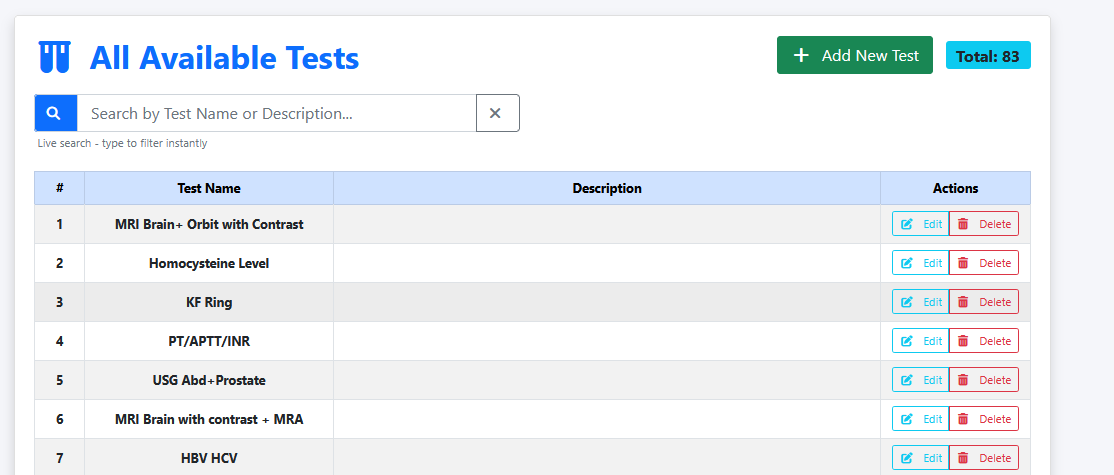
Primary Action Handler: Top right par custom green "+ Add New Test" button panel jo new entries injection models activate karta hai.
-
Live Records Counter Counter: High-visibility cyan validation tag container jo database ke exact total parameters trace karta hai (e.g., dynamic count display: "Total: 83").
-
-
Search Engine Architecture
-
Asynchronous Live Search Bar: Central input text box (with placeholder text "Search by Test Name or Description...") jo type karne par text string match karke filtering algorithms update karta hai (with manual layout clear shortcut "X" handle link).
-
-
Diagnostic Records Directory Grid (Master Table Rows)
-
Systematic Data Grid Columns: Information pipeline mapped into structured datasets layout tracks containing parameters: Serial Number (
#),Test Name,Descriptionparameters block, aur inline structuralActions. -
Active Live Diagnostic Records Data List:
-
MRI Brain+ Orbit with Contrast (Specialized neuro-imaging configuration).
-
-
-
Inline Database Operations Toolbar
-
Edit Handle Button: Light-blue custom anchor selector box inline with active rows to fetch parameters data back to processing interfaces.
-
Delete Handle Button: Soft red alert action link configured to execute database row purge operations safely.
-
Clinical Template Engine & Specialized Neurological Order-Set Matrix
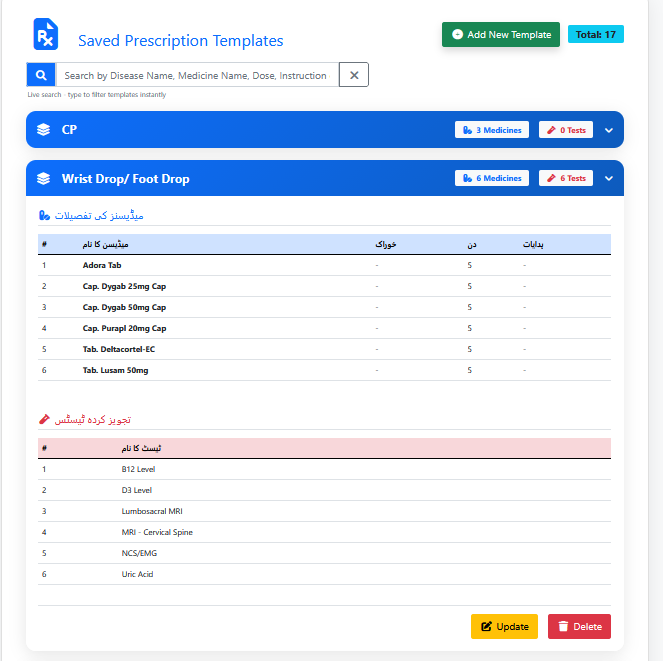
A production-grade, highly intuitive EMR Template and Protocol Management system engineered to maximize clinician charting velocities within high-traffic specialty care environments. This architecture enables senior medical practitioners to build, encapsulate, and white-label multi-tier clinical order-sets—combining dual-synchronized tabular arrays for localized pharmaceutical lists and complex neuro-radiological/electrophysiological testing definitions into an expandable accordion-driven framework.
Features
-
Encapsulated Accordion State Configuration: High-scannability workspace organizing multi-medicine and multi-test treatment matrices into interactive color-coded layout bars featuring dynamic inline inventory count badges.
-
Bi-Lingual Right-to-Left (RTL) Data Schemas: Locally optimized interface design integrating clean Urdu typography structures for tabular diagnostic headers to ensure localized operator alignment.
-
Asynchronous Multi-Variable Indexing Subsystem: Advanced string-matching filter bar executing instantaneous template lookups across extensive disease names, specific medicine molecular formulas, or dosage guidelines.
-
Pre-Programmed Specialized Clinical Frameworks: Out-of-the-box templates pre-configured with detailed neurological protocols mapping sequential complex drug tracks (e.g., Gabaminergic modulators, corticosteroids, tremor control therapies) synced with standardized 5-day iteration loops ($d$).
-
Integrated Electrophysiological & Imaging Orders Mapping: Complete clinical pathways pre-loaded with specialized diagnostic profiles including advanced spinal neuro-imaging (Cervical/Lumbrosacral MRI), specialized metabolic blood biomarkers, and core electrophysiological testing (NCS/EMG).
-
Watertight Global CRUD Operations Tools: Decentralized structural control links providing localized entry additions controls, secure Update interfaces, and protected Delete actions vectors to maintain absolute database integrity.
Manage Instructions Module Description
Manage Instructions module hospital backend configurations ka aik specialized metadata controller hai jo prescriptions template generator ko support karta hai. Is interface ki primary capability yeh hai ke yeh system operators ko medication intake guidelines (jaise khane ke auqat ya parhaiz) ko simultaneous English aur localized Urdu text string formats mein capture, map, aur store karne ki facility deta hai. Is dynamic database management engine ke zariye prescriptions par bilingual clear output generation automated ho jati hai.
Key Components
-
Header Controls & Mode Indicator
-
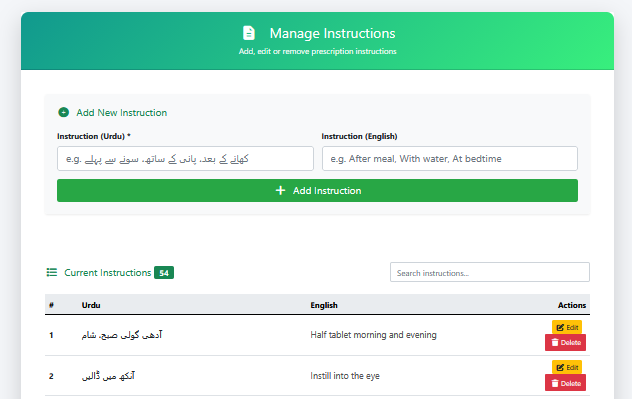
Action Context Banner: Top functional green header container labeled "Manage Instructions" (Subtext: "Add, edit or remove prescription instructions").
-
Sub-Section Trigger Header: Inner card anchor link labeled "+ Add New Instruction" jo primary configuration setup grid code runs karta hai.
-
-
Bilingual Data Intake Panel (Add Instruction Form)
-
Instruction (Urdu) Input Area: Mandatory field equipped with smart Right-to-Left (RTL) writing layout direction parameters and placeholder guide text tracking local phrases:
e.g. کھانے کے بعد، پانی کے ساتھ، سونے سے پہلے. -
Instruction (English) Input Area: Corresponding alphanumeric standard text field holding professional medical usage placeholders:
e.g. After meal, With water, At bedtime. -
Form Submission Handle: Solid green primary call-to-action button layout labeled "+ Add Instruction" to lock records and commit rows to the relational database.
-
New / Edit Prescription Wizard Description
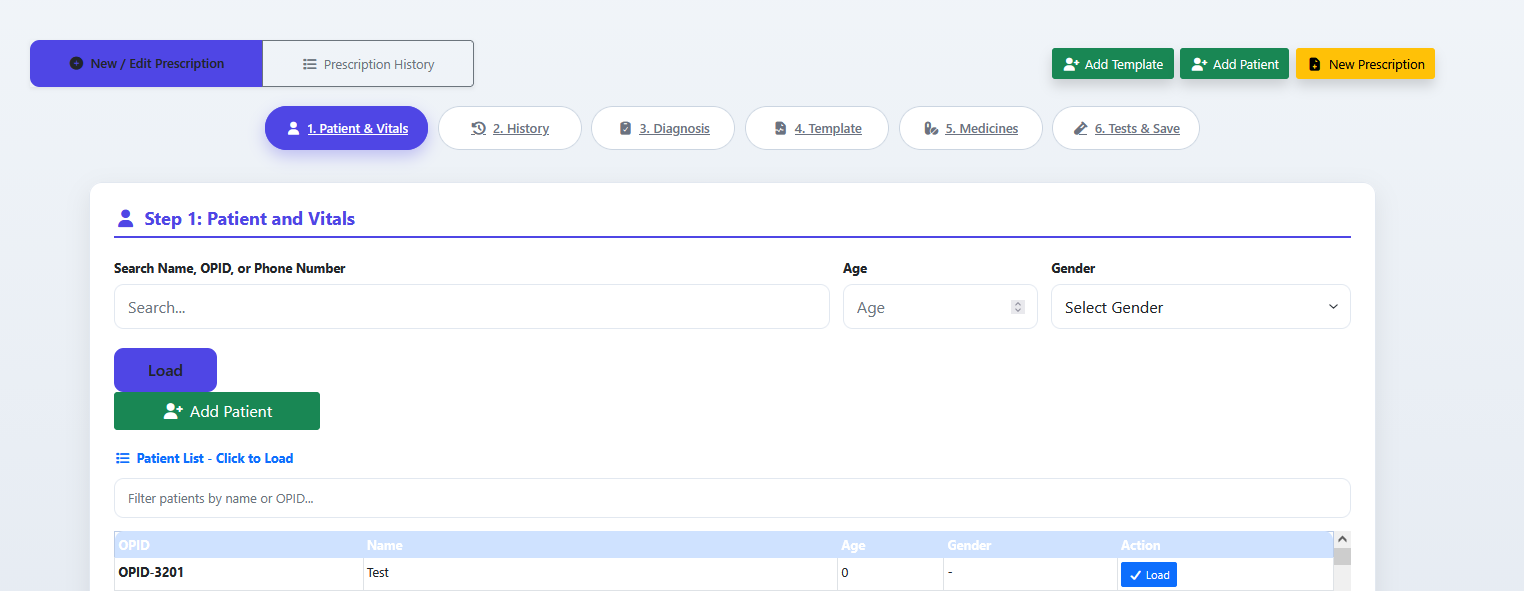
New / Edit Prescription module clinicians aur medical operators ke liye design kiya gaya ek systematic 6-step entry wizard hai, jo structured parameters ke zariye raw patient charting aur prescription building ko simplify karta hai. Iska dynamic navigation setup steps ko logical flow mein link karta hai, jahan step-1 ke andar existing data nodes ko asynchronously fetch karne ke liye instant lookups layout, manual fields selection parameters, aur clear table indicators shamil hain.
Key Components
-
Master Operation Mode Toggles & Global Shortcuts
-
Primary View Switcher: Top left corner par tabs group: New / Edit Prescription (Active state) aur Prescription History tracker panel.
-
Global Action Shortcuts Matrix: Top right par standard utility triggers buttons: "+ Add Template" (green), "+ Add Patient" (green), aur highlight select index control "New Prescription" (yellow).
-
-
Linear Multi-Step Process Stepper Timeline
-
Workflow tracking navigation pills jo multi-stage clinical recording lifecycle ko represent karte hain:
-
1. Patient & Vitals (Current Active View)
-
2. History (Chief complaints and medical timeline notes)
-
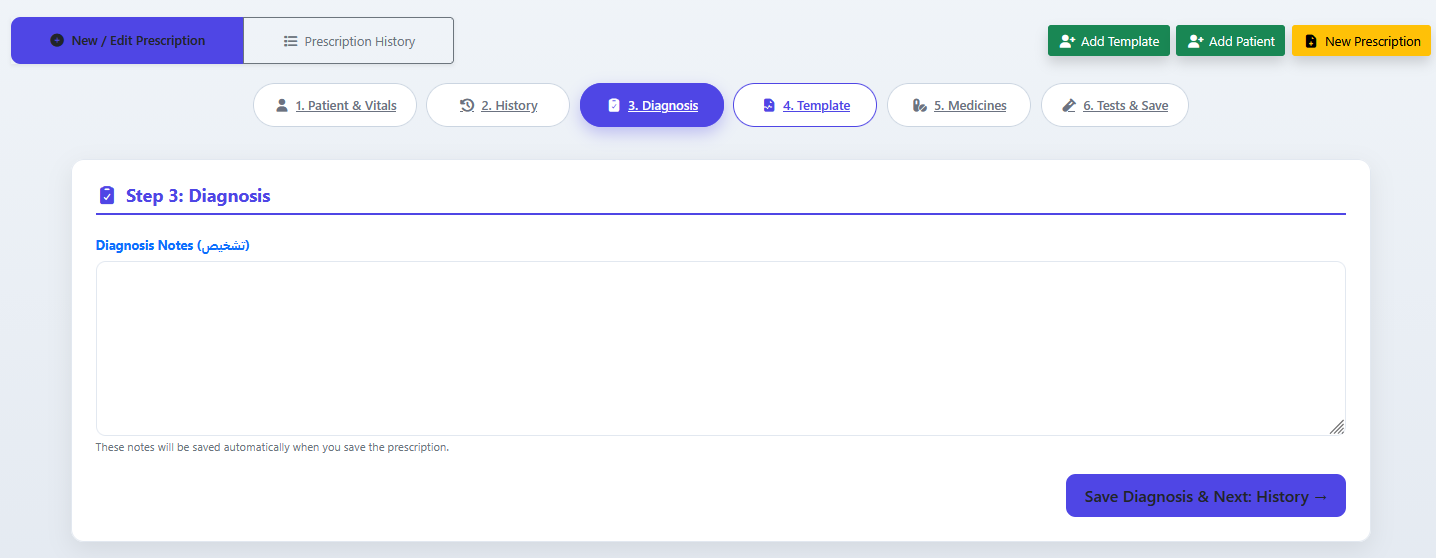
3. Diagnosis (Definitive clinical conclusions entry)
-
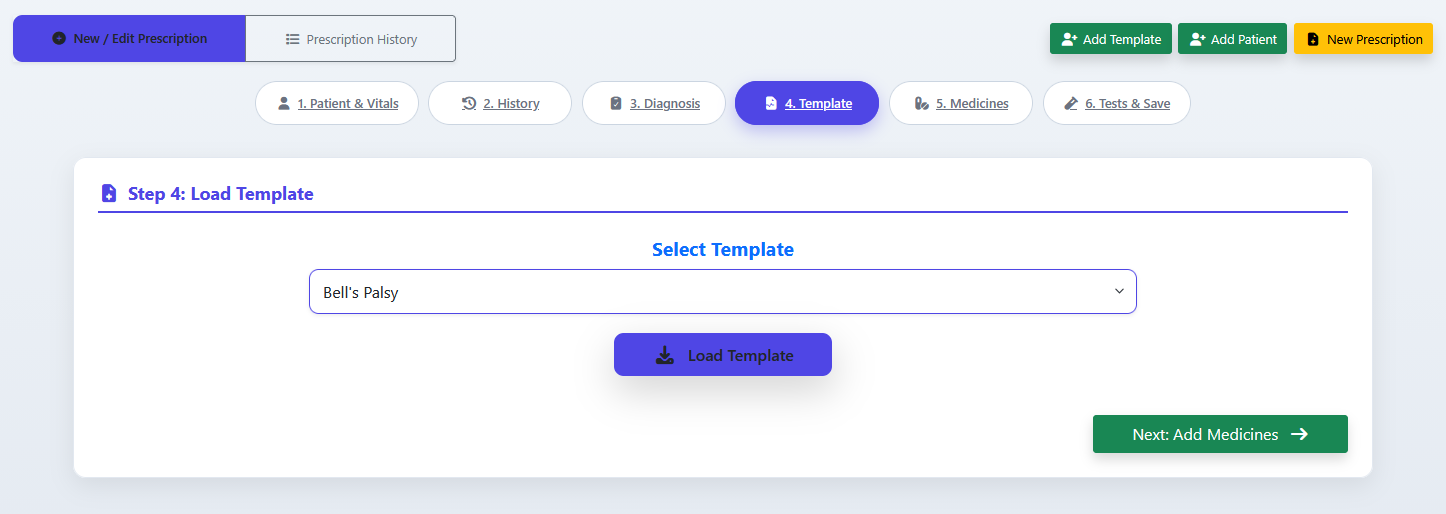
4. Template (Pre-saved protocol bundles loading desk)
-
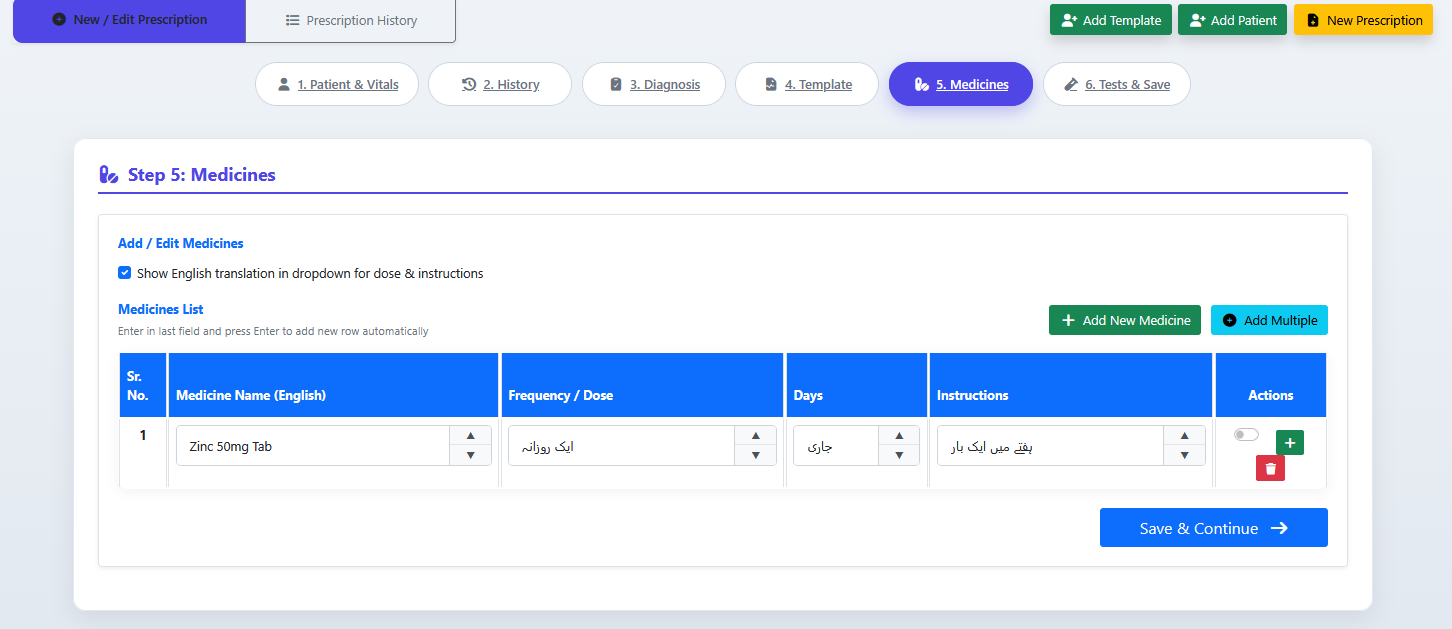
5. Medicines (Dynamic searchable pharmacy configuration panel)
-
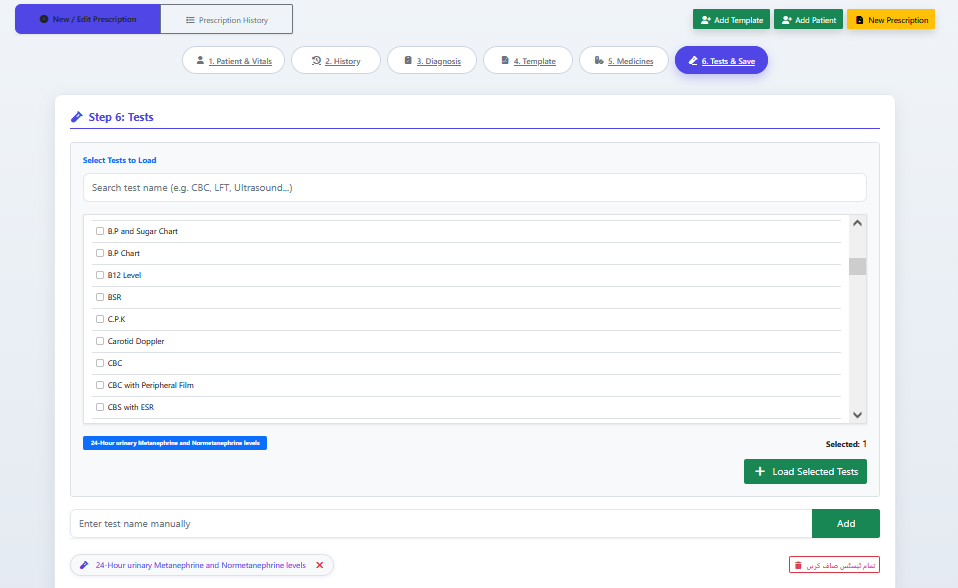
6. Tests & Save (Diagnostics linking and final database execution checkpoint)
-
-
-
Step 1 Workspace: Patient Information Filtering Hub
-
Multi-Criteria Search Container: Central input text box (with placeholder text "Search...") allowing operators to instantly query existing records via Name, OPID, or Phone Number strings.
-
Manual Demographic Fields: Adjoining quick-entry overrides features containing numerical spinner selector box for Age and a selection dropdown for Gender.
-
Processing Command Links: Unified action controls buttons including blue "Load" handle vector and dark green secondary "+ Add Patient" button shortcut.
-
-
Patient Directory Grid (Click to Load Interface)
-
Secondary List Filter Area: Input search overlay bar containing guide text "Filter patients by name or OPID..." to sub-filter active loaded lists dynamically.
-
Master Index Grid Columns Schema: Data table layout separating structural parameters:
OPID,Name,Age,Gender, and instant execute workflow handle columnAction. -
Active Sample Patient Log: Displays indexed data rows (e.g., OPID-3201 / Test / 0 / -) equipped with a solid blue "✓ Load" button to lock the chart and transition to the subsequent vitals and medical logging step.
-
History Panel
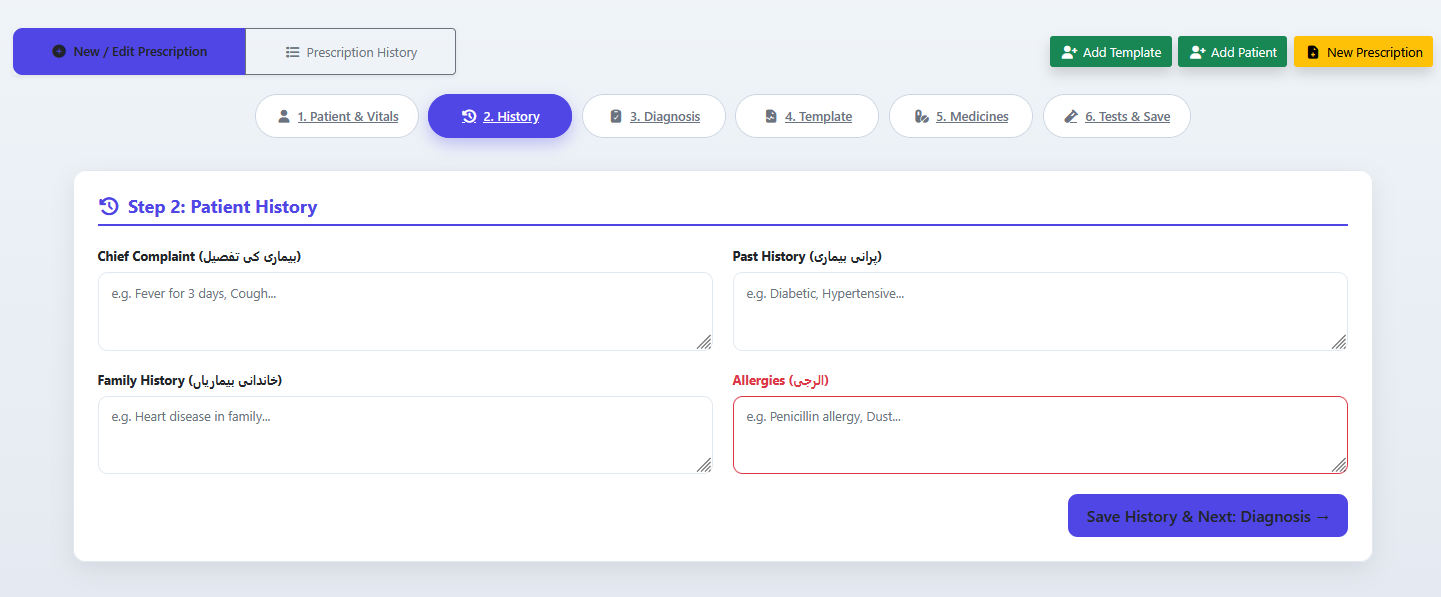
Diagnose
Load Template's
Medicine
Test's
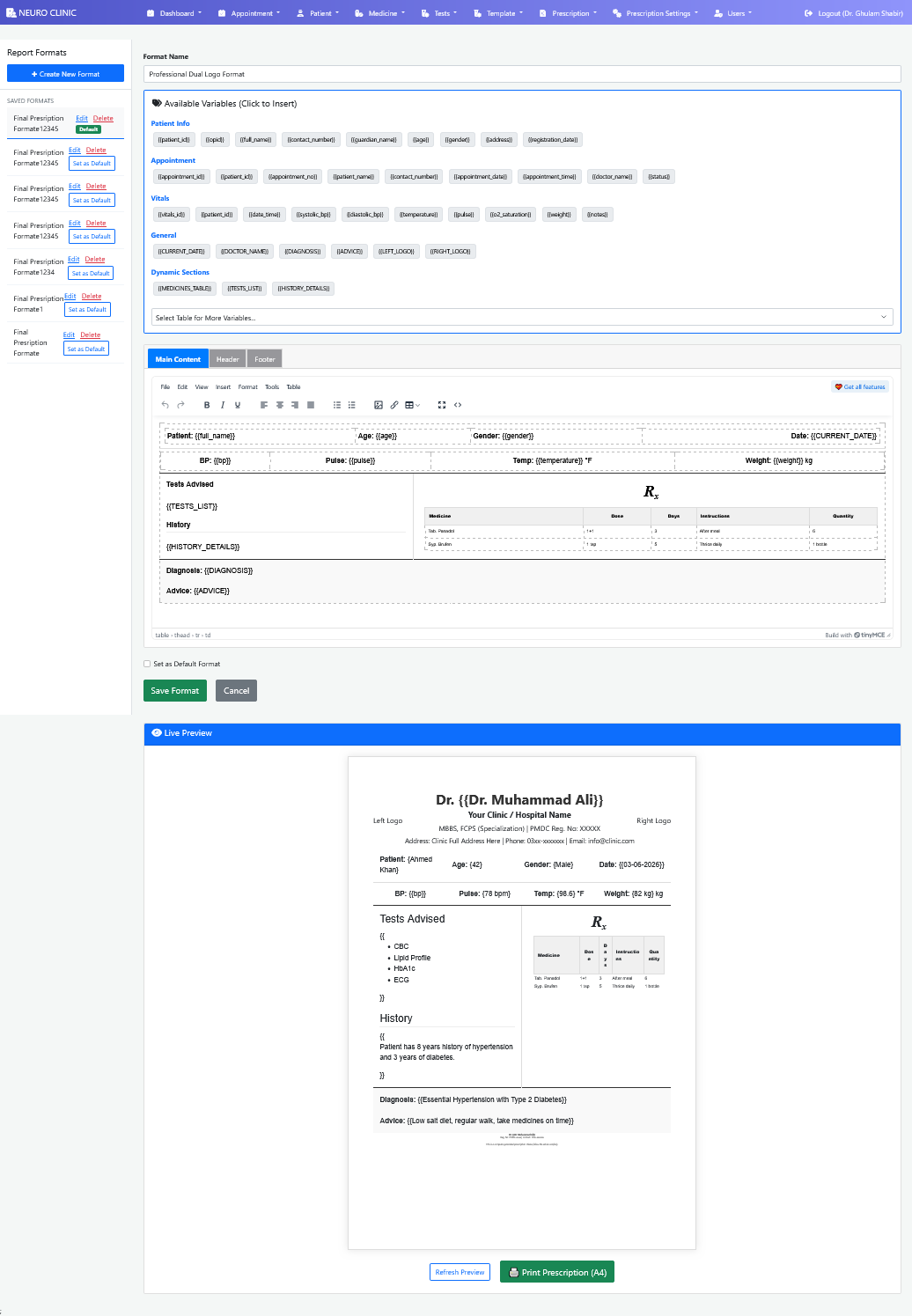
Advanced Report Formats Customizer & Dynamic Merge-Tag Print Engine
A highly sophisticated, enterprise-grade Report Template Engine and Document Personalization customizer designed to architect, store, and dynamically print medical communications sheets including automated e-prescription receipts, multi-tier diagnostic laboratory workflows, and official healthcare documents. This architecture integrates a robust multi-variable token repository (covering patient demographics, real-time vitals diagnostics, and automated looping table sections arrays) with an advanced WYSIWYG editor framework and a dual-synchronized, A4-scaled asynchronous Live Preview viewport.
Features
-
Granular Alphanumeric Merge-Tag Architecture: Multi-tier dynamic placeholder tag injection repository mapping core electronic health metrics cleanly into five high-scannability classification domains.
-
Integrated Industrial WYSIWYG TinyMCE Module: Production-grade Rich Text Canvas equipped with extensive text manipulation capabilities, table structure builders, HTML grid formatting variables, and specialized multi-tier Section Controller tabs (Main Content, Header, Footer).
-
Asynchronous High-Fidelity Rendering Viewport: Highly responsive Live Preview layout module performing instantaneous variable extraction and rendering fake placeholder strings directly into clinical-grade document layouts.
-
Complex Tabular Array Looping Controls: Advanced data parsing system providing specialized section array placeholders (
{{MEDICINES_TABLE}},{{TESTS_LIST}}) configured to loop database table record sets dynamically into structured grid containers. -
White-Label Branding Layout Matrix: Built-in support for dual logo parameters alignments (Left Logo / Right Logo), doctor metadata text grids formatting options, and multi-line institutional header strings tracking.
-
One-Click Localized Standard Hardware Printing: Enterprise operational controllers linking real-time layout updates hooks directly into high-visibility system action overrides (Print Prescription [A4] button anchors) optimized for clean, immediate hardware printer output matching.
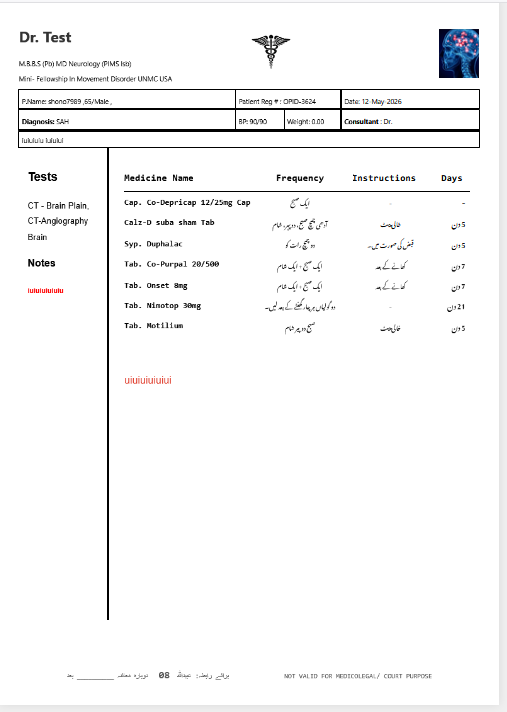
High-Fidelity Medical Prescription Print Engine & Bilingual Rendering Output Layout
A production-grade, highly optimized Medical Prescription Print Layout and Patient Communication output engine engineered to convert complex relational electronic health databases into clean, clinical-grade physical documentation layouts. Built explicitly to ensure absolute patient comprehension, this high-scannability format splits continuous diagnostic datasets into specialized sidebar slots for neuro-radiological tests while executing a dynamic multi-column billing/pharmacy grid equipped to concurrently render localized right-to-left (RTL) Urdu administrative frequencies alongside alphanumeric standard English drug profiles.
Features
-
Structural Double-Split Grid Architecture: Sophisticated document layout design featuring clear visual separation between primary pharmaceutical orders tables and standalone left-aligned columns tracking multi-line diagnostic investigation listings (CT Brain Plain / CT Angiography).
-
Bilingual Dynamic Script Injection Module: Enterprise localization compiler executing real-time database lookups to populate the dosage Frequency, intake Instructions, and treatment Days modules inside responsive Urdu calligraphy loops.
-
Granular Multi-Variable Patient Banner: Centralized data box layout container parsing high-end clinical details including specific baseline blood pressure fields ($mmHg$), specialized neurological diagnosis flags (e.g., SAH), validation timestamps, and unique patient indices ($OPID$).
-
Flexible Corporate Branding Framework: Built-in headers layout balancing complex multi-line practitioner credential arrays with specialized medical Caduceus vector parameters and premium neuro-anatomical graphics placeholders.
-
Watertight Legal Disclaimer Auditing: Automated system safety scripts printing persistent medical-legal compliance strings (
NOT VALID FOR MEDICOLEGAL/ COURT PURPOSE) to shield institutional accountability frameworks. -
Localized Follow-Up Routing Footer: Dynamic Right-to-Left (RTL) text string container embedding automated clinic communication touchpoints and blank follow-up appointment tracking lines cleanly above page boundaries.
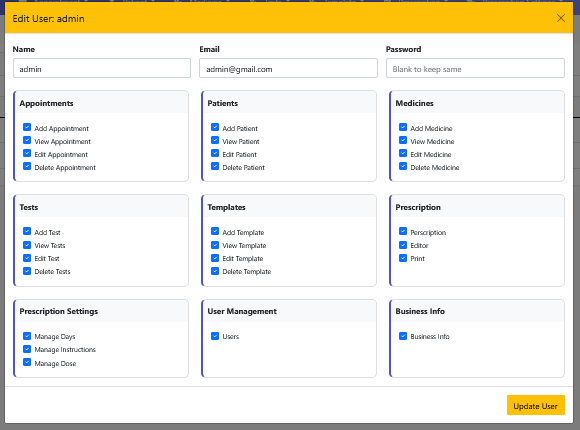
Edit User & RBAC Permissions Module Description
Edit User Permissions module hospital platform ka core Role-Based Access Control (RBAC) gateway hai, jo individual employee profiles ke credentials aur granular system rights ko update karne ke liye use hota hai. Yeh interactive dashboard administrative users ko full credentialing controls (jaise name adjustment, email verification, aur security-safe hidden password configurations) dene ke sath-sath hospital database ke har operational zone (CRUD segments) ke functions ko checkbox triggers ke zariye individual levels par grant ya revoke karne ki complete access control processing provide karta hai.
Key Components
-
Header Controls & Context Bar
-
Action Banner Status: High-visibility clear amber header context area labeled "Edit User: admin" (with manual exit component icon "X" in the top right corner).
-
-
User Master Account Credentials Matrix
-
Name Input Field: Account identity identifier block holding core string logs (current input value display:
"admin"). -
Email Input Field: Central notification node and login profile address mapping container (current input display:
"admin@gmail.com"). -
Password Mask Field: Secure security logic field for updates, equipped with dynamic validation placeholder text:
"Blank to keep same".
-
-
Granular Functional Access Sections (Module-Wise Permission Cards)
-
Appointments Access Card: Controls booking logs actions via individual triggers: Add Appointment, View Appointment, Edit Appointment, and Delete Appointment.
-
Patients Access Card: Regulates clinical files intake configurations: Add Patient, View Patient, Edit Patient, and Delete Patient.
-
Medicines Access Card: Locks pharmacy master inventories registry rows: Add Medicine, View Medicine, Edit Medicine, and Delete Medicine.
-
Tests Access Card: Manages laboratory diagnostics dictionary items: Add Test, View Tests, Edit Test, and Delete Tests.
-
Templates Access Card: Governs reusable prescription formats bundles: Add Template, View Template, Edit Template, and Delete Template.
-
Prescription Flow Card: Validates operational clinical execution capabilities: Prescription (spelled "Perscription" in UI), Editor, and Print capability authorizations.
-
Prescription Settings Card: Secures meta-data optimization structures rules parameters: Manage Days, Manage Instructions, and Manage Dose.
-
User Management Card: Restricts administrative access control lists via individual status check toggle: Users.
-
Business Info Card: Isolates localized practice info settings adjustments toggles: Business Info.
-
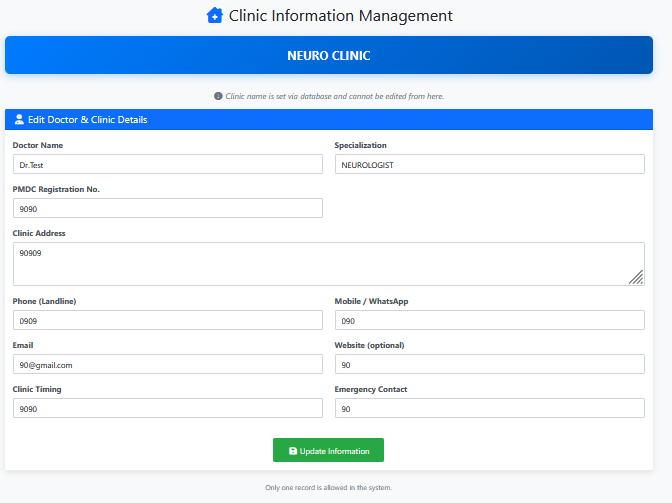
Clinic Information Management Module Description
Clinic Information Management module system administration ka primary identity configurator hai jo automated document prints aur application headers ko localized identity provide karta hai. Is dashboard ke zariye hospital ya private practice ki central credentials configuration (jaise PMDC medical registration numbers, official contact line-ups, timings matrix, aur digital media handles) ko organize kiya jata hai. Is module mein dynamic database locks lagaye gaye hain taake primary global entries control structure strictly secure rahe.
Key Components
-
Administrative Master Locks & Status Banners
-
Global Title Indicator: Top centered blue section icon header container labeled "Clinic Information Management".
-
Primary Brand Presenter Display: High-visibility centered dark-blue banner containing fixed system configuration: "NEURO CLINIC".
-
Database Validation Alert Notice: Center-aligned structural lock disclaimer text:
“Clinic name is set via database and cannot be edited from here.”to maintain strict multi-tenant or licensing integrity. -
System Record Constraints Message Footer: Bottom contextual data protection string text:
“Only one record is allowed in the system.”indicating a clean singleton design pattern structure.
-
-
Edit Doctor & Clinic Details Workspace Form
-
Doctor Name: Alphanumeric practitioner text box tracking the primary consultant (captured value log:
"Dr.Test"). -
Specialization: Area of expertise indexing text box mapping clinical categories (captured value entry:
"NEUROLOGIST"). -
PMDC Registration No: State healthcare council authorization key validation input box (captured numerical sequence log:
"9090"). -
Clinic Address Area: Comprehensive multiline text box field engineered to save geographical location formats for prescription headers (placeholder tracking:
"90909"). -
Phone (Landline) & Mobile / WhatsApp: Split channels entry block allocating distinct telecommunication arrays for patient booking desks.
-
Email & Website (Optional): Digital interaction collection input containers for electronic medical reports dispatches and clinic portfolio linking.
-
Clinic Timing: Operational consulting schedules availability description box mapping.
-
Emergency Contact: Dedicated critical triage backup calling line indicator.
-