ERP Lab Plus Software Mangement System
Here is the clean documentation with only the core module descriptions and key components: 1.
Features
About This Software
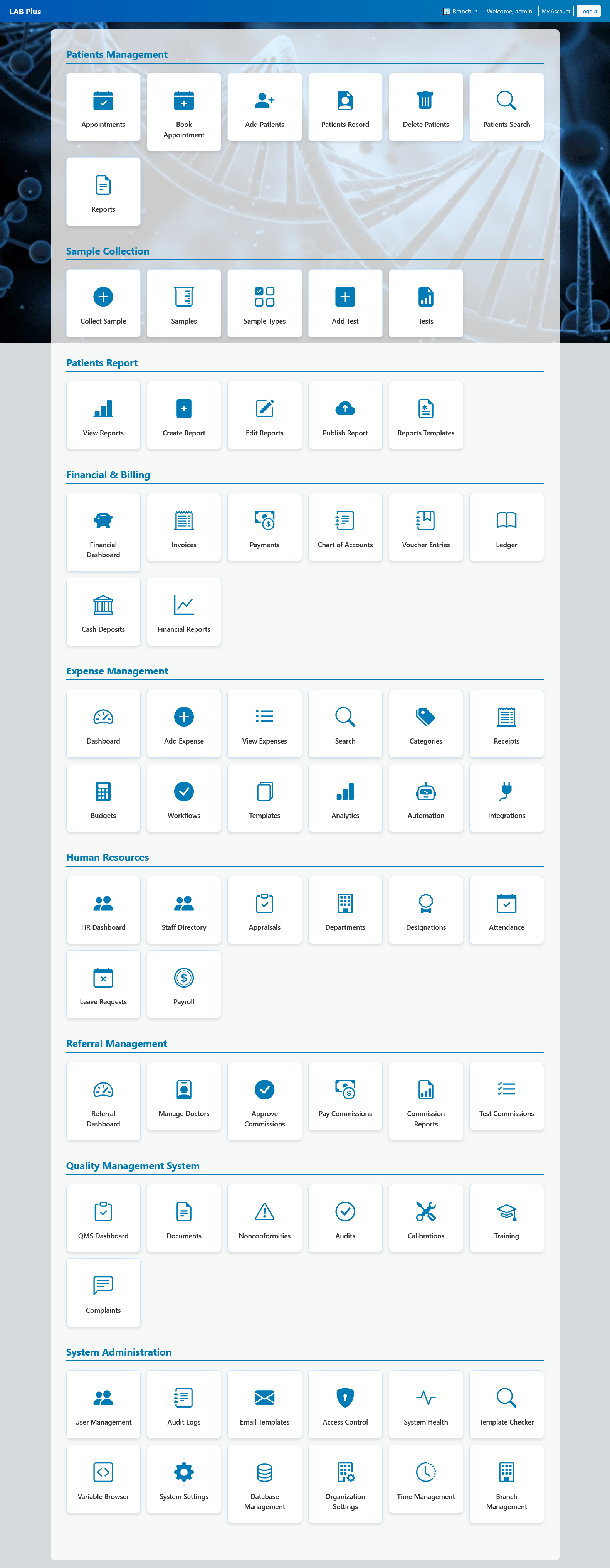
Here is the clean documentation with only the core module descriptions and key components:
1. Patients Management
Module Description
The Patients Management module serves as the primary gateway for front-office laboratory workflows. It provides front-desk operators with comprehensive coordination tools to book appointments, create persistent demographic entries, search historical records, and generate analytical intake summaries.
Key Components
-
Appointments & Booking: A dedicated calendar workspace configured to track incoming lab test requests and prevent booking slot collisions.
-
Add Patients & Record Indexing: An onboarding form engineered to capture structural patient demographics and assign a unique master tracking index.
-
Patients Record & Search: An advanced alphanumeric lookup engine used by operators to extract historical lab charts securely via specific query lines.
-
Reports: An analytical pipeline designed to generate demographic data summaries, peak check-in intervals, and front-desk velocity matrices.
2. Sample Collection
Module Description
The Sample Collection module is the execution cockpit for laboratory phlebotomists and technicians. It orchestrates the early stages of the testing lifecycle by controlling specimen accessioning, barcode generation, fluid classification, and direct routing parameters.
Key Components
-
Collect Sample: A live verification console matching barcode labels with patient information during physical draw sequences.
-
Samples Log: A real-time tracking grid indicating current specimen statuses (e.g., Collected, In-Transit, Inside Centrifuge, Processing).
-
Sample Types: A customizable dictionary builder used to define biological parameters (e.g., Whole Blood, Spot Urine, Serum, Tissue Biopsy).
-
Add Test & Configuration: An interface bridging incoming biological specimens with required clinical lab test profiles.
3. Patients Report
Module Description
The Patients Report module is a clinical documentation builder and verification hub where pathology findings and radiologic interpretations are compiled. It utilizes structured templates and dynamic approval workflows to provide secure clinical validation layers before final release.
Key Components
-
Create & Edit Reports: A flexible WYSIWYG text canvas equipped to input digital laboratory parameter outputs manually or via integrated analyzer APIs.
-
Report Templates: A template manager hosting pre-formatted, reusable structural layouts for hematology, biochemistry, and microbiology reporting.
-
Publish Report: A validation layer that appends electronic practitioner signatures and releases finalized report PDFs directly to automated patient download portals.
4. Financial & Billing
Module Description
The Financial & Billing module is the core transactional accounting engine of the diagnostic facility. It handles cash flows across the entire enterprise, connecting frontline point-of-sale invoicing directly with back-office double-entry ledgers and profit-and-loss auditing sheets.
Key Components
-
Financial Dashboard: A real-time executive visualization screen tracking gross collections, outstanding credit balances, and operational cash-on-hand.
-
Invoices & Payments: A multi-mode checkout interface processing itemized test billings, discount parameters, advance deposits, and active balances.
-
Chart of Accounts (CoA) & Ledger: A structured financial classification system backed by tamper-proof, double-entry journal logging mechanisms.
-
Cash Deposits & Financial Reports: Daily counter-balancing tools paired with automated closing parameters to generate audited balance sheets.
5. Expense Management
Module Description
The Expense Management module acts as a granular tracking engine for facility overhead distributions, consumable procurement, and vendor payouts. It enforces administrative control over organizational cash outflows by linking expense requests with clear approval hierarchies.
Key Components
-
Add Expense & Categories: An administrative entry form separating expenditures into structured accounts (e.g., Lab Reagents, Chemical Controls, Utility Bills, Equipment Leases).
-
Budgets & Workflows: Pre-programmed fiscal thresholds tied to multi-level manager approvals to prevent unauthorized resource drain.
-
Receipts & Integrations: An attachment bridge supporting image file uploads to link physical vendor bills directly into matching ledger entries.
6. Human Resources
Module Description
The Human Resources module optimizes workforce management by centralizing employee scheduling, monitoring professional shifts, and verifying credential compliance across laboratory teams, pathologists, and technical assistants.
Key Components
-
HR Dashboard & Staff Directory: A secure master directory managing roles, system access logs, contact channels, and employment contracts.
-
Attendance & Leave Requests: A real-time time-tracking system built to sync physical check-in events directly from biometric hardware sensors.
-
Appraisals & Payroll: An automated compensation engine mapping employee performance scores, leave deductions, and bonuses directly into monthly pay slips.
7. Referral Management
Module Description
The Referral Management module handles B2B affiliate tracking and healthcare marketing collaborations. It calculates external consultant references, coordinates corporate clinic partnerships, and maps payout rules based on pre-configured diagnostic tariff rates.
Key Components
-
Manage Doctors & Affiliates: A centralized business directory managing external medical practitioners, reference codes, and affiliate communication profiles.
-
Approve & Pay Commissions: A revenue-sharing engine that calculates dynamic split payouts based on complex percentage or fixed-tariff logic.
-
Test Commissions & Reports: An auditing utility that maps reference analytics to identify high-performing referral vectors and trace payment lifecycles.
8. Quality Management System (QMS)
Module Description
The Quality Management System (QMS) module enforces international healthcare compliance standard operating procedures (SOPs). It hosts specific controls to log process anomalies, calibrate biomedical analyzers, track internal system audits, and manage patient grievances.
Key Components
-
Nonconformities & Audits: An incident logging engine designed to flag, track, and resolve laboratory processing mistakes, cross-contaminations, or analytical issues.
-
Calibrations Tracking: A maintenance ledger detailing calibration dates, accuracy margins, and scheduled fine-tuning cycles for automated lab machinery.
-
Complaints & Training Records: A customer service dashboard tracking patient feedback, linked with continuous training modules for internal laboratory personnel.
9. System Administration
Module Description
The System Administration module serves as the primary configuration engine and master control panel for the entire LAB Plus ecosystem. It grants system architects absolute control over user privileges, relational database partitions, branch-wide environment settings, and data security streams.
Key Components
-
User Management & Access Control: A granular checkbox configuration matrix executing role-based access control (RBAC) to restrict system visibility based on employee rank.
-
Audit Logs & System Health: A continuous security monitoring system compiling transaction histories alongside real-time server telemetry dashboards.
-
Database Management & Branch Setup: A cluster management suite conducting automated SQL server backups, database indexing optimization, and data synchronization across decentralized physical laboratory branches.
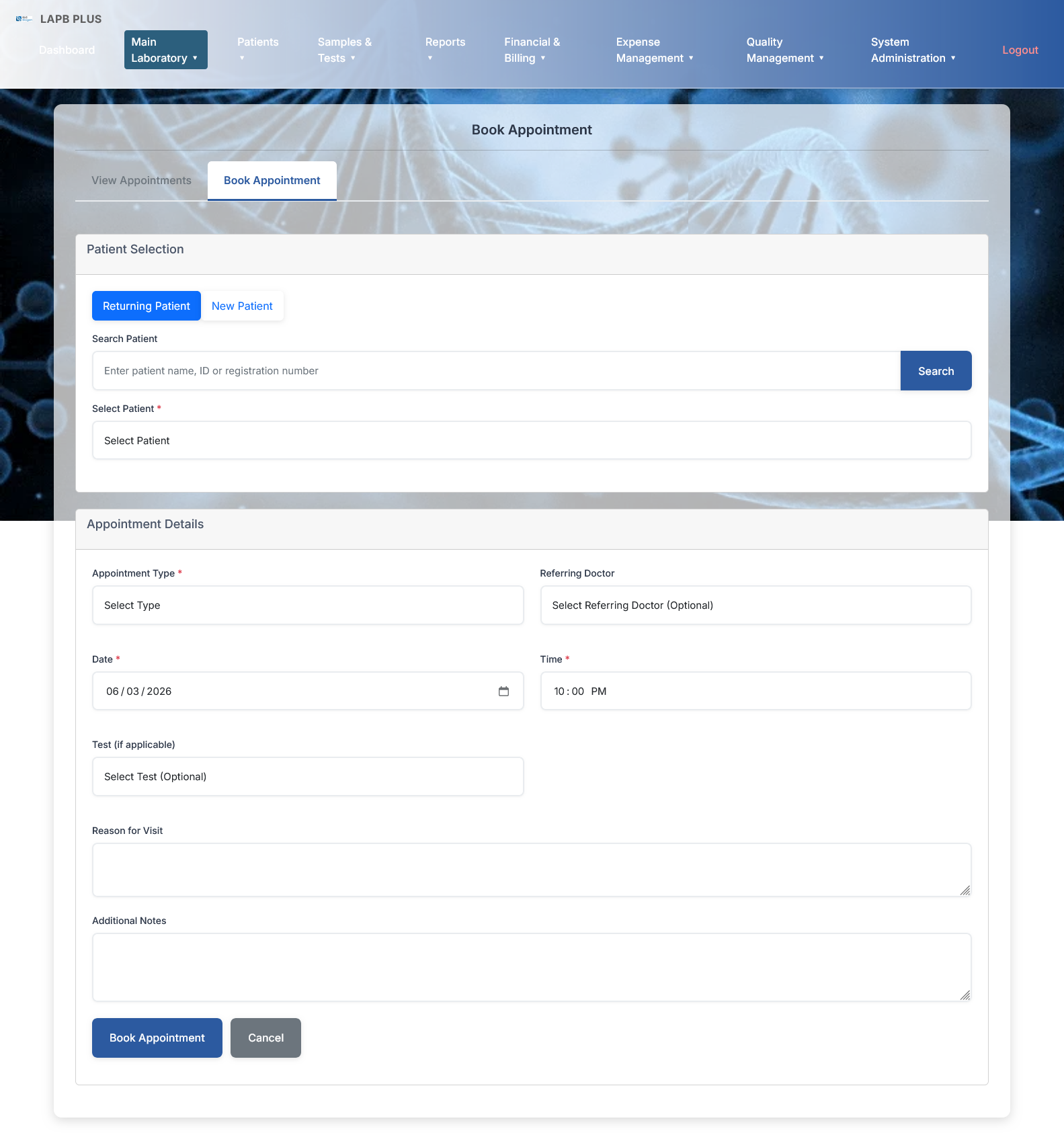
Patient Onboarding
-
Sub-Tabs: Toggle between View Appointments and Book Appointment
-
Status Switcher: Blue active pill for Returning Patient next to New Patient
-
Search Panel: Input bar for Name/ID/Registration with a blue Search button
-
Validation Box: Required Select Patient dropdown container
Appointment Settings
-
Routing Inputs: Required Appointment Type and optional Referring Doctor dropdowns
-
Time-Slot Grid: Date picker locked at 06/03/2026 and time field set to 10:00 PM
-
Lab Allocation: Auxiliary Select Test (Optional) selection block
Documentation & Forms
-
Loggers: Two independent, wide multiline text canvases for Reason for Visit and Additional Notes
-
Execution Tools: Blue Book Appointment submission button paired with a gray Cancel handle
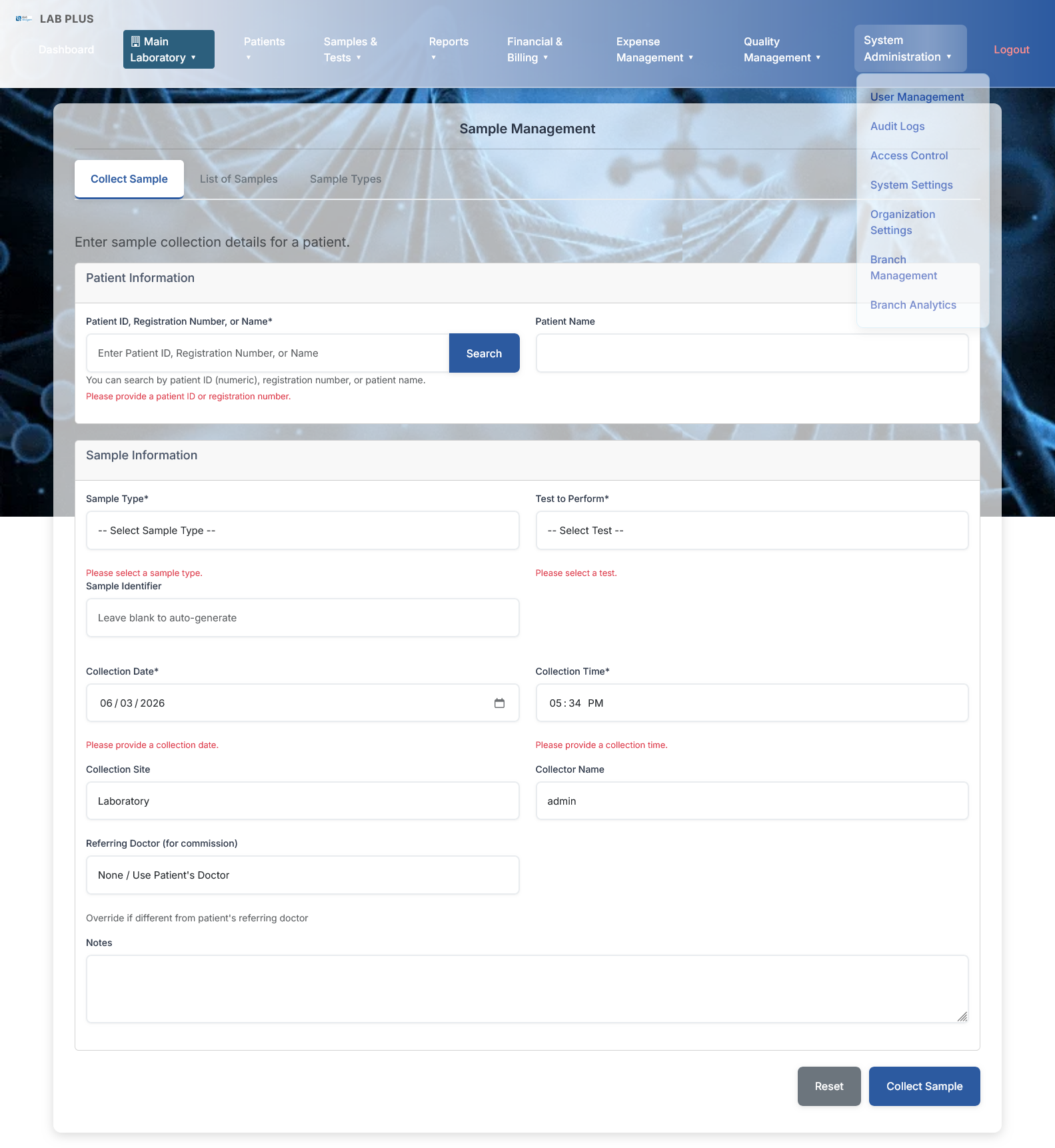
Patient Information Panel
-
Search Matrix Field: Alphanumeric inquiry input box holding placeholder text: "Enter Patient ID, Registration Number, or Name", paired alongside a primary blue "Search" execute button
-
Search Help Subtext: System guide prompt parsing parameters: "You can search by patient ID (numeric), registration number, or patient name." accompanied by a red alert validation line: "Please provide a patient ID or registration number."
-
Patient Name Output Block: A disabled/read-only wide presentation box configured to display the fetched patient identity records dynamically
Sample Information Form
-
Core Selectors Grid: Dual required parameters inputs with underlying red validation alerts:
-
Sample Type: Dropdown selector showing placeholder: "-- Select Sample Type --" (Alert: "Please select a sample type.")
-
Test to Perform: Dropdown container showing placeholder: "-- Select Test --" (Alert: "Please select a test.")
-
-
Serialization Track: An auto-generation override input labeled Sample Identifier containing helper text: "Leave blank to auto-generate"
-
Time-Slot Grid: System-synced chronological parameters:
-
Collection Date: Required calendar element locked at system timestamp 06/03/2026 (Alert: "Please provide a collection date.")
-
Collection Time: Required time picker pre-filled at baseline counter 05:34 PM (Alert: "Please provide a collection time.")
-
-
Operational Trackers: Clean administrative metadata loggers:
-
Collection Site: Static/Select text input configured as "Laboratory"
-
Collector Name: User-session tracker auto-filled with active technician profile: "admin"
-
-
Referral Mapping Node: An auxiliary tracking field labeled Referring Doctor (for commission) holding default string value: "None / Use Patient's Doctor" with sub-text indicator: "Override if different from patient's referring doctor"
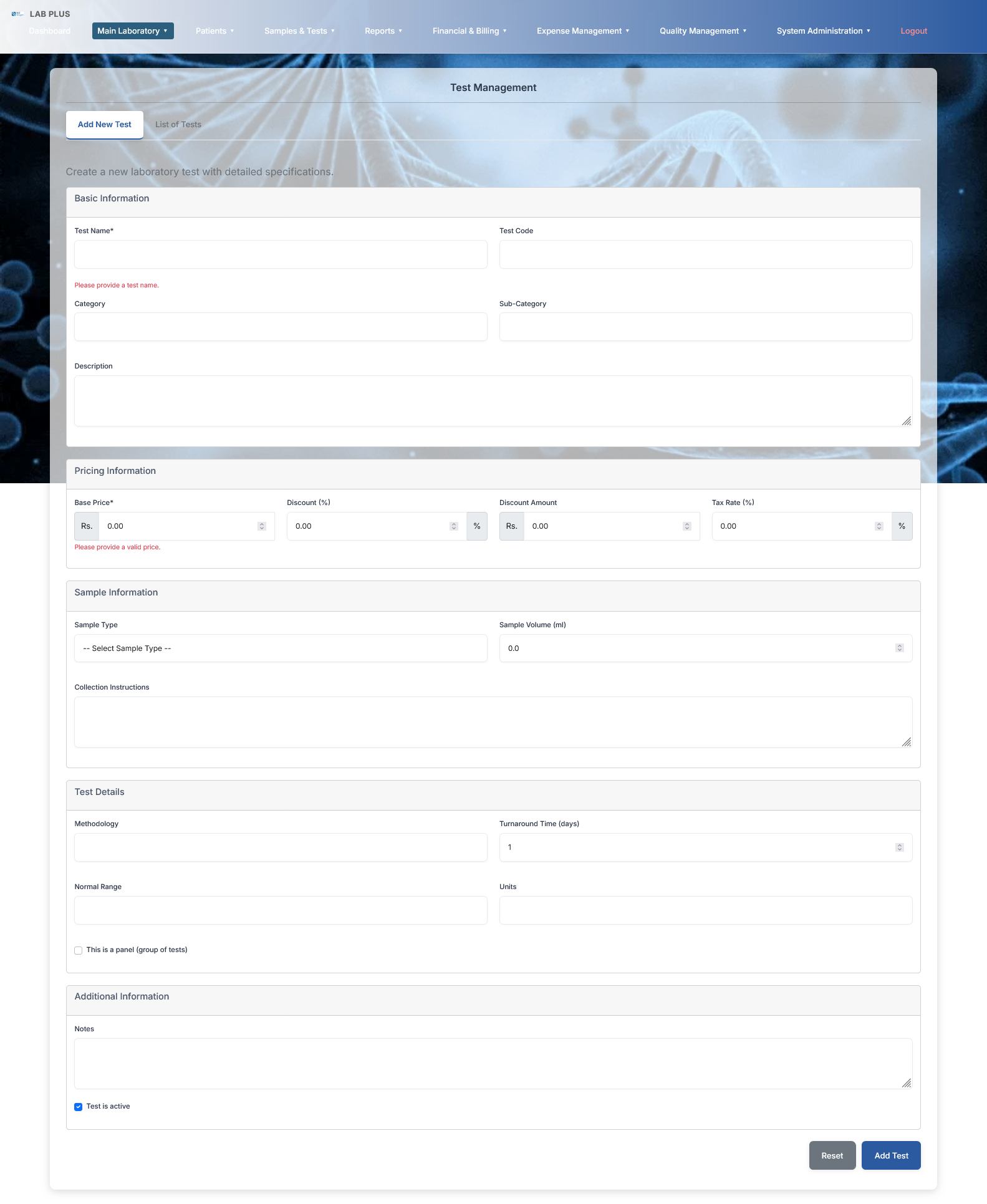
Basic Information Panel
-
Core Identifiers: Required Test Name box (with red validation alert: "Please provide a test name.") paired with an alphanumeric Test Code input field
-
Taxonomy Grid: Dropdown or text selection containers for Category and Sub-Category mapping
-
Description Canvas: Wide multiline text slot for logging detailed procedural or test background parameters
Pricing Information Panel
-
Base Price: Required currency numerical selector box displaying baseline value Rs. 0.00 (with red validation alert: "Please provide a valid price.")
-
Discount Parameters: Split fields tracking percentage values (Discount (%) with a localized
%suffix element) and absolute monetary reductions (Discount Amount) -
Taxation Configurator: Direct numeric input container labeled Tax Rate (%) equipped with a structural
%tracking layout badge
Sample Information Panel
-
Specimen Setup: Dropdown menu for Sample Type showing default text: "-- Select Sample Type --"
-
Volume Matrix: Precision numerical spinner field labeled Sample Volume (ml) set at initial baseline 0.00
-
Collection Instructions: Wide multiline text container designed to pre-program specific phlebotomy or fasting guidelines
Test Details Panel
-
Methodology & Timeline: Alphanumeric field for clinical Methodology alongside a numerical duration spinner tracker labeled Turnaround Time (days) initialized at 1 day
-
Reference Ranges: Standard text boxes mapping Normal Range structures and corresponding measurement Units
-
Grouping Logic Toggle: Checkbox selector switch labeled "This is a panel (group of tests)" to support multi-parameter panel orchestration
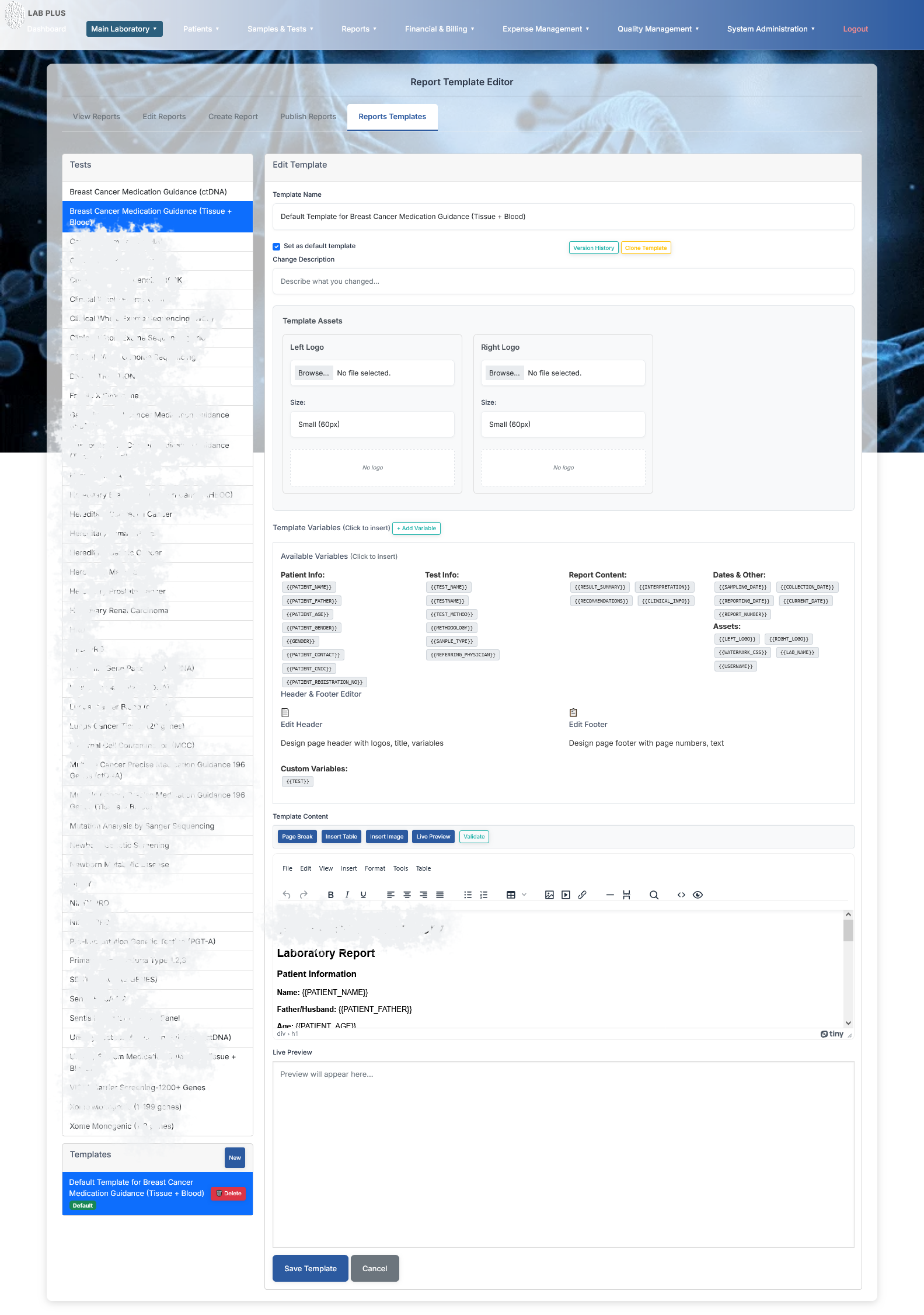
Tests & Templates Registry
-
Tests Catalog Stack: Extensive clinical diagnostics registry index containing high-end molecular and genetic test parameters (e.g., Breast Cancer Medication Guidance (Tissue + Blood) highlighted in blue, Chromosome Sequencing-100K, Leukemia Gene Panel, NIFTY PRO).
-
Templates Active Stack: Bottom sub-panel tracking saved layouts (active node showing blue container: "Default Template for Breast Cancer Medication Guidance (Tissue + Blood)" with red Delete handle).
Central Configuration Workspace (Edit Template)
-
Template Metadata: Alphanumeric name field displaying long structural name entry, paired with checkbox toggle: "✓ Set as default template" alongside Version History and Clone Template triggers.
-
Change Log Box: Text input field labeled Change Description (Placeholder: "Describe what you changed...").
-
Branding Assets Matrix: Balanced asset slots for uploading Left Logo and Right Logo graphic elements alongside size setting text inputs (pre-filled at
Small (60px)).
Template Variables Section (Merge Tags System)
-
Categorized structural data badges acting as short-code placeholders designed for instant one-click injection:
-
Patient Info:
{{PATIENT_NAME}},{{PATIENT_FATHER}},{{PATIENT_AGE}},{{GENDER}},{{REG_DATE}}tokens. -
Test Info:
{{TEST_NAME}},{{METHODOLOGY}},{{SAMPLE_TYPE}}strings. -
Report Content:
{{RESULT_SUMMARY}},{{OBSERVATIONS}}loop markers. -
Dates & Assets:
{{REPORTING_DATE}},{{LEFT_LOGO}},{{LAB_NAME}}variables.
-
-
Section Customizers: Inline links for launching standalone Edit Header and Edit Footer modules.
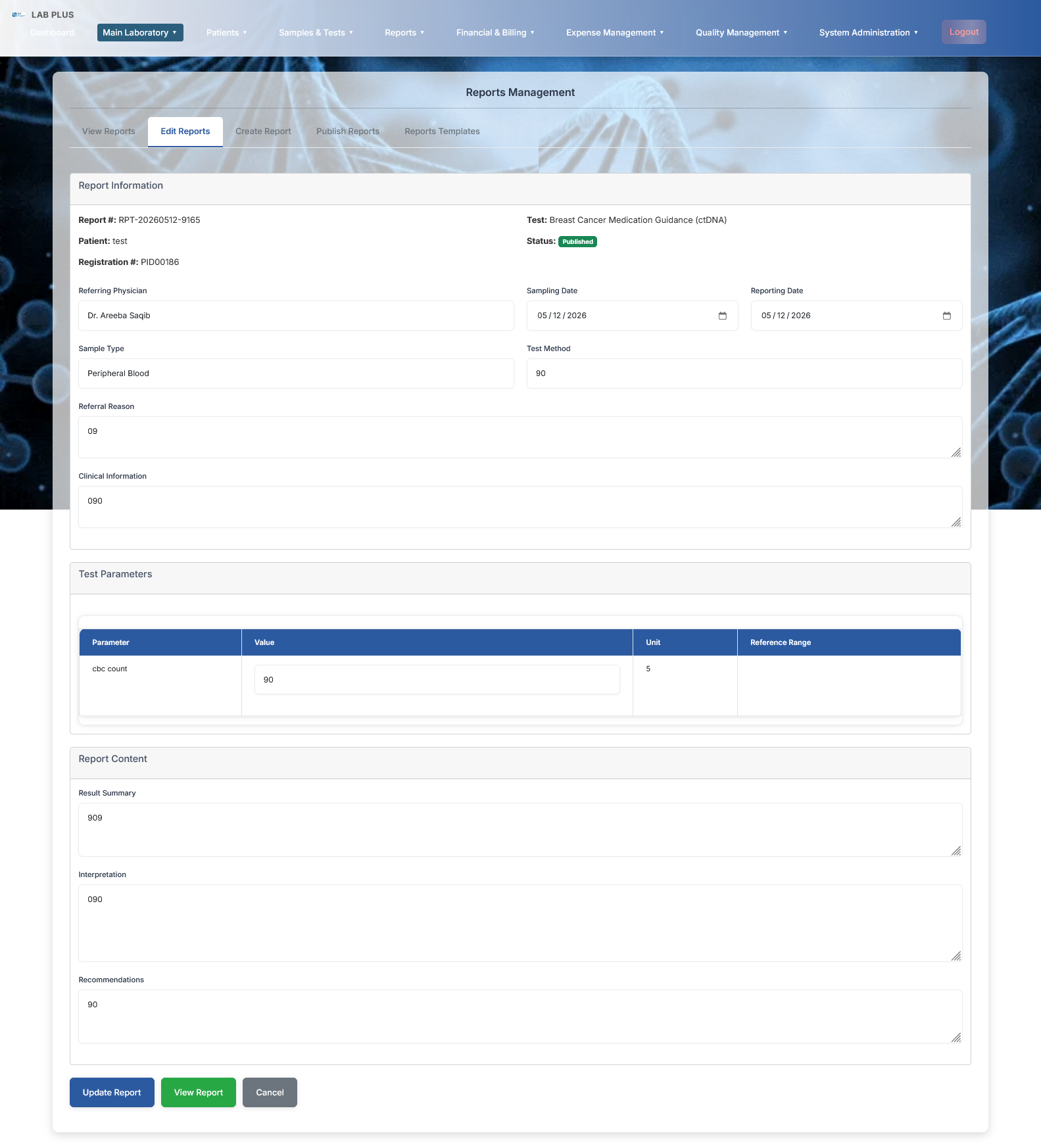
Report Information Panel
-
Metadata Baseline Read-Outs: Static tracking variables mapping active data parameters:
-
Report #:
RPT-20260512-9165 -
Patient Name:
test -
Registration #:
PID00166 -
Target Investigation:
Breast Cancer Medication Guidance (ctDNA) -
Current State Tag: High-visibility green status badge labeled "Published"
-
-
Logistical Tracker Fields: * Referring Physician: Displaying input string record "Dr. Areeba Saqib"
-
Sampling & Reporting Dates: Dual core timeline calendar views displaying pre-filled historical values: 05/12/2026
-
Sample Type: Alphanumeric field tracking biological source classification: "Peripheral Blood"
-
Test Method: Alphanumeric methodology tracker entry field (holding value:
90)
-
-
Narrative Context Slots: Wide multiline input boxes detailing clinical background logs (showing temporary tracking variables:
09and090under Referral Reason and Clinical Information).
Test Parameters Grid
-
Structured Data Columns: Tabular results scheme cleanly separating row properties:
Parameter,Value,Unit, andReference Range. -
Active Variable Entry Row: Displaying active laboratory metric parameters:
-
Parameter:
cbc count -
Value Box: Responsive input container holding active measurement parameter entry: 90
-
Unit: Displaying diagnostic scale notation marker: 5
-
Reference Range: Standard database baseline limits check block container.
-
Report Content Narrative Panel
-
Result Summary: Wide multiline free-text canvas optimized for entering clinical macro outputs summary configurations (captured log:
909). -
Interpretation: Specialized multi-row narrative description text container tracking comprehensive medical diagnosis findings and diagnostic notes (captured log:
090). -
Recommendations: Dedicated, bottom wide text slot designed to compile follow-up procedures tracking or specific practitioner warning guidelines (captured log:
90).
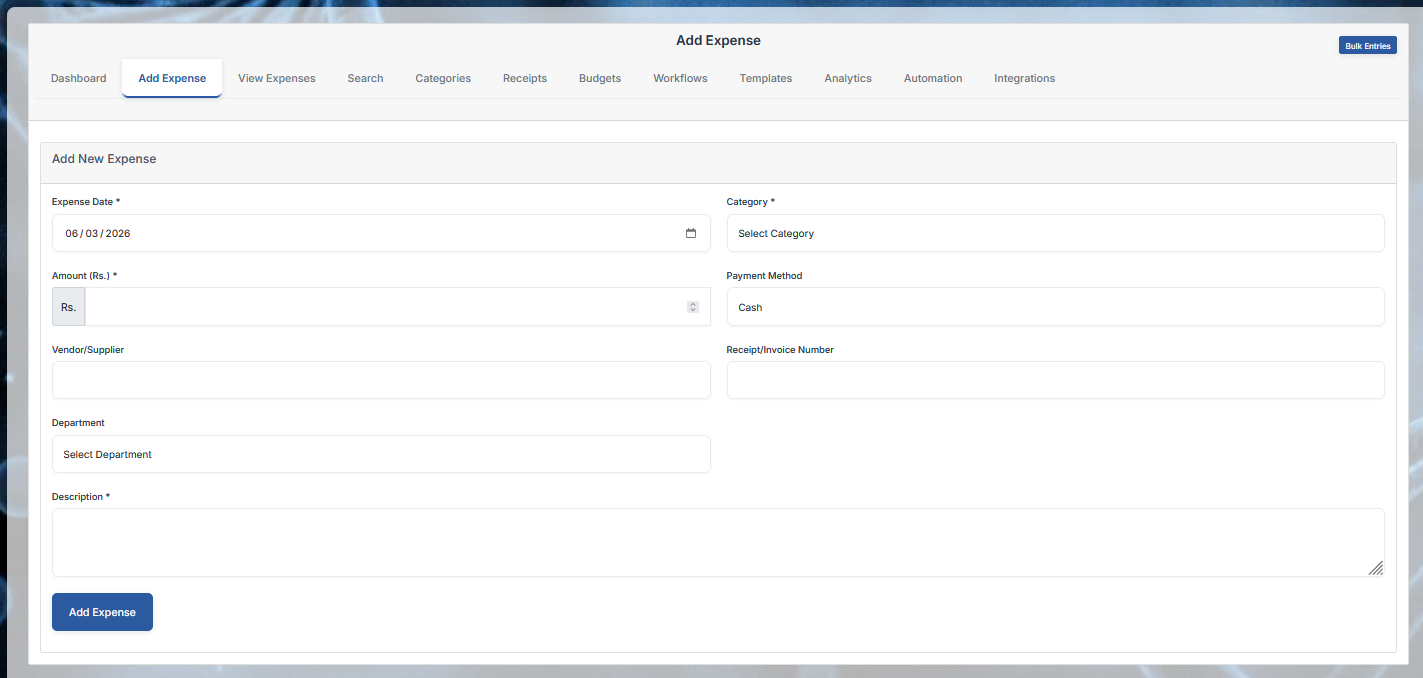
Expense Parameters Form Fields
-
Expense Date: Mandatory input block equipped with an active system calendar selector displaying the locked date sequence value: 06 / 03 / 2026.
-
Category: Mandatory allocation dropdown menu showing default selection string: "Select Category".
-
Amount (Rs.): Mandatory precision numeric spinner input box pre-fixed with the localized currency symbol "Rs.".
-
Payment Method: Administrative settlement dropdown pre-filled with baseline tracking option: "Cash".
-
Vendor/Supplier: An alphanumeric text entry container designed to map corporate vendors, B2B procurement partners, or chemical reagents suppliers.
-
Receipt/Invoice Number: A dedicated record tracking box to save reference numbers matching physical payment receipts.
-
Department: Corporate routing dropdown menu tracking internal cost centers showing placeholder: "Select Department".
Set Budget Form
-
Category Selection: Core routing dropdown allocation container displaying placeholder: "Select Category".
-
Budget Amount: A precision numeric spinner field configured to map currency limits parameters.
-
Budget Period: Timeline tracking validation box displaying localized dynamic date string value: 2026-06.
-
Form Action Handle: Solid blue transaction commit execution button labeled "Save Budget".
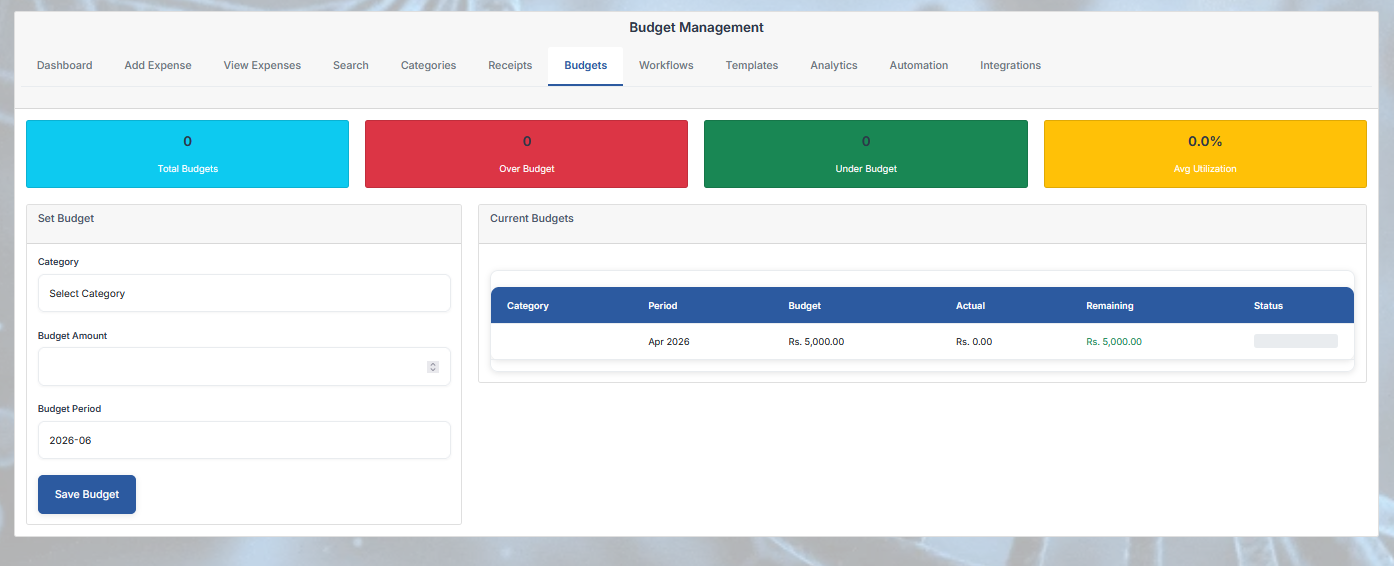
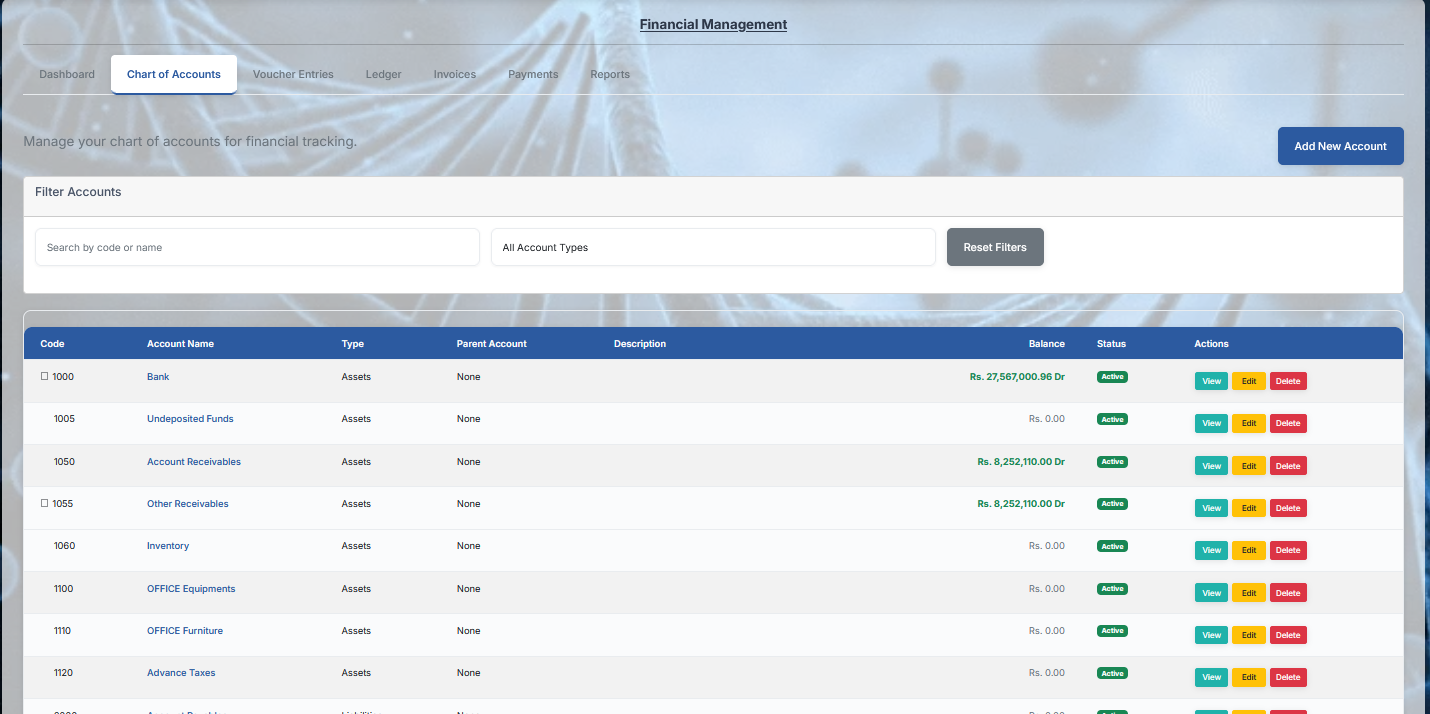
Chart of Accounts Grid Layout
-
Structured Ledger Columns: Relational data columns dividing corporate asset logs parameters:
Code,Account Name,Type,Parent Account,Description,Balance,Status, and inline operation handlers labeledActions. -
Active Assets Accounts List Logs:
-
Code 1000 | Bank: Type:
Assets| Parent:None| Balance: Displayed in bold green text tracking open transactional rows: Rs. 27,567,000.96 Dr | Status: Active green badge. -
Code 1005 | Undeposited Funds: Type:
Assets| Parent:None| Balance:Rs. 0.00| Status: Active green badge. -
Code 1050 | Account Receivables: Type:
Assets| Parent:None| Balance: Running debit tracking string: Rs. 8,252,110.00 Dr | Status: Active green badge. -
Code 1055 | Other Receivables: Type:
Assets| Parent:None| Balance: Running debit tracking string: Rs. 8,252,110.00 Dr | Status: Active green badge. -
Code 1060 | Inventory: Type:
Assets| Parent:None| Balance:Rs. 0.00| Status: Active green badge. -
Code 1100 | OFFICE Equipments: Type:
Assets| Parent:None| Balance:Rs. 0.00| Status: Active green badge. -
Code 1110 | OFFICE Furniture: Type:
Assets| Parent:None| Balance:Rs. 0.00| Status: Active green badge. -
Code 1120 | Advance Taxes: Type:
Assets| Parent:None| Balance:Rs. 0.00| Status: Active green badge.
-
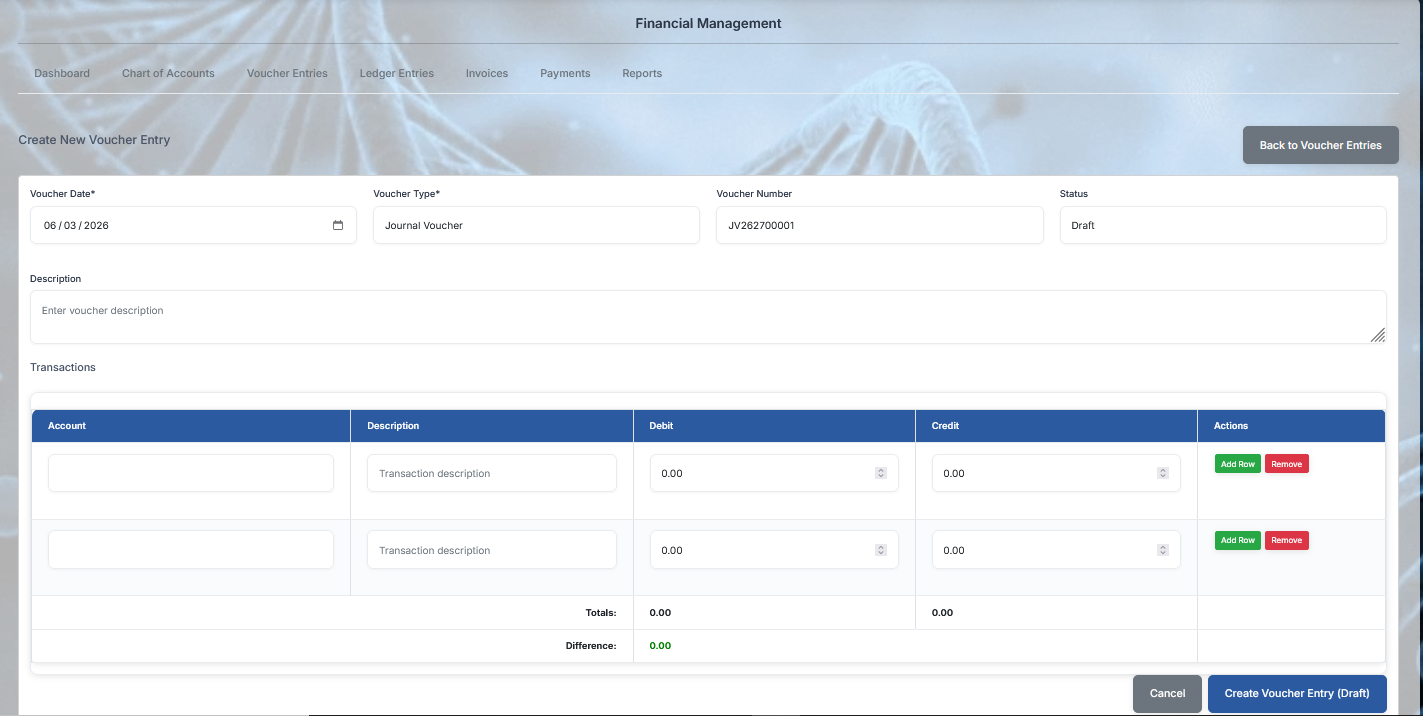
Double-Entry Balancing Grid
-
Structured Table Schema Columns: Grid header properties separating individual accounting segments:
Account,Description,Debit,Credit, andActions. -
Dynamic Transaction Entry Rows: Double-row layout array designed to isolate split journal actions:
-
Account Selection Field: Dropdown/Search text boxes to assign ledger entities from the Chart of Accounts.
-
Description Field: Inline text boxes holding placeholder string: "Transaction description".
-
Debit / Credit Numeric Spinners: Precision input fields to insert currency values, initialized at standard baseline 0.00.
-
Row Micro-Actions: Localized override utility anchors mapping a green "Add Row" block shortcut next to a solid red "Remove" line handle.
-
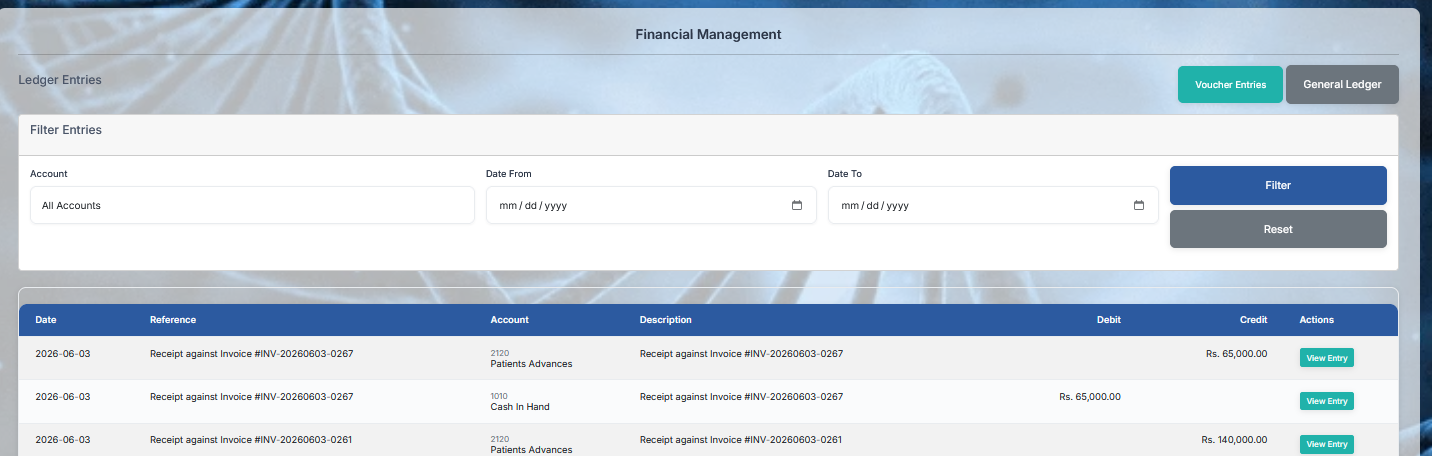
Filter Entries Sorting Workspace
-
Account Allocation Dropdown: A comprehensive account entities selector pre-filled with the default tracking option: "All Accounts".
-
Date Range Pickers (Date From / Date To): Chronological query boundaries text boxes featuring integrated calendar picker icon overlays displaying empty standard guidelines formatting text placeholders:
mm / dd / yyyy. -
Search Execution Controls: Right-aligned vertical stacking buttons group hosting a solid blue primary submission handle labeled "Filter" next to a dark gray canvas reset button labeled "Reset".
Master General Ledger Transaction Grid
-
Structured Table Schema Columns: Clear database columns organizing transactional ledger histories:
Date,Reference,Account,Description,Debit,Credit, and inline operational triggers labeledActions. -
Active Historical Financial Log Rows:
-
Row 1: Date:
2026-06-03| Reference & Description:Receipt against Invoice #INV-20260603-0267| Account:2120 Patients Advances| Credit Allocation: Rs. 65,000.00. -
Row 2: Date:
2026-06-03| Reference & Description:Receipt against Invoice #INV-20260603-0267| Account:1010 Cash In Hand| Debit Allocation: Rs. 65,000.00.
-
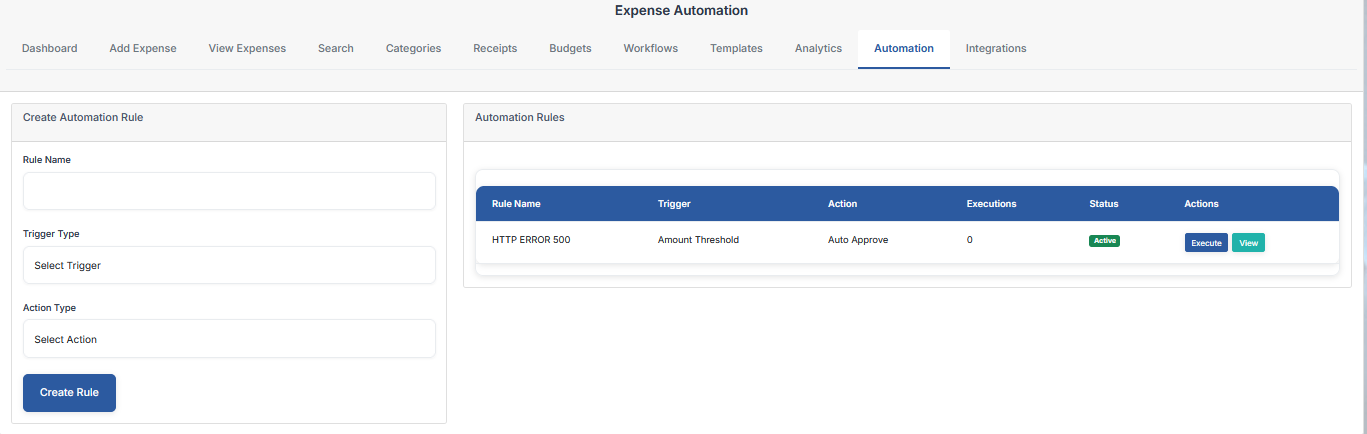
Create Automation Rule Form
-
Rule Name: An alphanumeric text entry container box designed to define corporate spending rules patterns.
-
Trigger Type Selection: A mandatory condition selector dropdown menu displaying background layout placeholder text: "Select Trigger".
-
Action Type Selection: A mandatory operational execution dropdown menu showing placeholder text string: "Select Action".
-
Form Action Handle: Bottom-aligned solid blue submission logic verification button labeled "Create Rule".
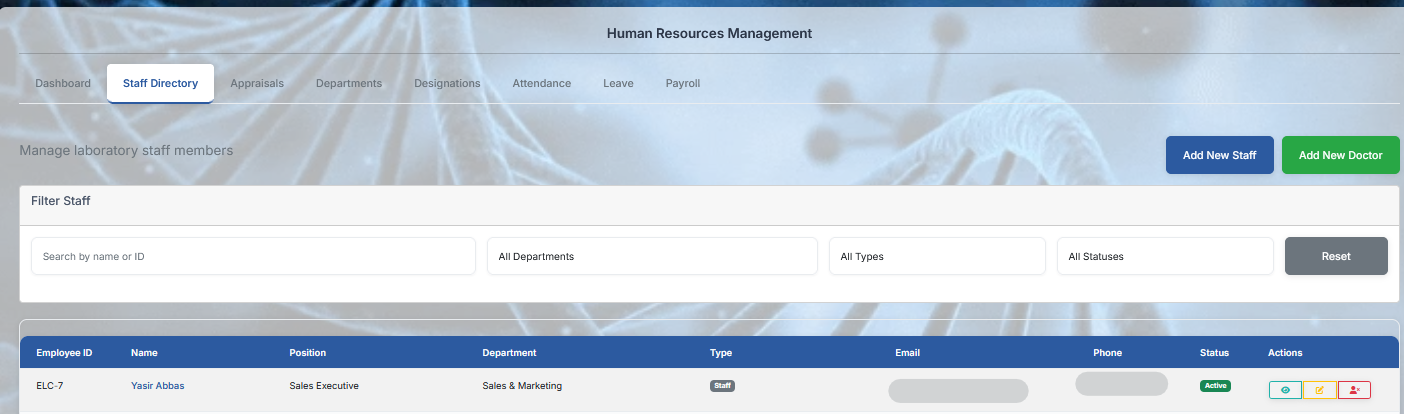
Staff Directory Screen Details
-
Section Title & Global Onboarding: Labeled "Human Resources Management" with Staff Directory active; includes dark blue "Add New Staff" and green "Add New Doctor" hooks.
-
Filter Staff Grid Workspace: Combines an alphanumeric "Search by name or ID" container text box with three dropdown filters (Department, Type, Status) and a gray "Reset" anchor.
-
Personnel Data Schema Columns: Relational grid separating workforce variables:
Employee ID,Name,Position,Department,Type,Email,Phone,Status, andActions. -
Active Employee Profile Log: Displays indexed staff files tracking row ELC-7 (Yasir Abbas) classified under Position: Sales Executive and Department: Sales & Marketing.
-
Secure Privacy Placeholders: The email and telephone database cell layouts render smooth, protected gray block pill visuals.
-
Privilege & Access Overrides Matrix: Active line elements host triple button icon assets tracking teal Profile View, yellow Data Modifier, and red Login Access/Status Block controls.
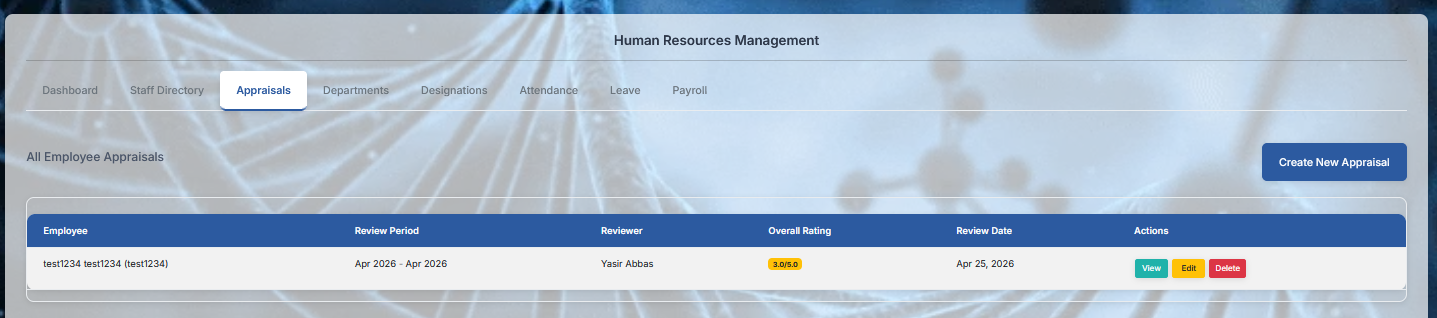
Appraisals Screen Details
-
Section Title & Sub-Menu: Labeled "Human Resources Management" with Appraisals active tab; includes a prominent top-right blue primary trigger labeled "Create New Appraisal".
-
Horizontal Navigation Links: Grid view sub-menu tracking personnel lifecycles: Dashboard, Staff Directory, Appraisals, Departments, Designations, Attendance, Leave, and Payroll.
-
Workspace Area Header: Left-aligned contextual table sub-heading labeled "All Employee Appraisals".
-
Data Table Schema Columns: Tabular performance evaluation layout structured under columns:
Employee,Review Period,Reviewer,Overall Rating,Review Date, and inline handlers labeledActions. -
Active Performance Evaluation Log Row: Displays indexed review history variables:
-
Employee:
test1234 test1234 (test1234)(A placeholder employee identification profile log). -
Review Period: Chronological cycle locked at Apr 2026 - Apr 2026.
-
Reviewer: Checked and assigned under verified staff profile: Yasir Abbas.
-
Overall Rating: Highlighted via a rounded yellow telemetry numeric score badge: 2.0/5.0.
-
Review Date: Evaluation finalization timestamp marked as Apr 25, 2026.
-
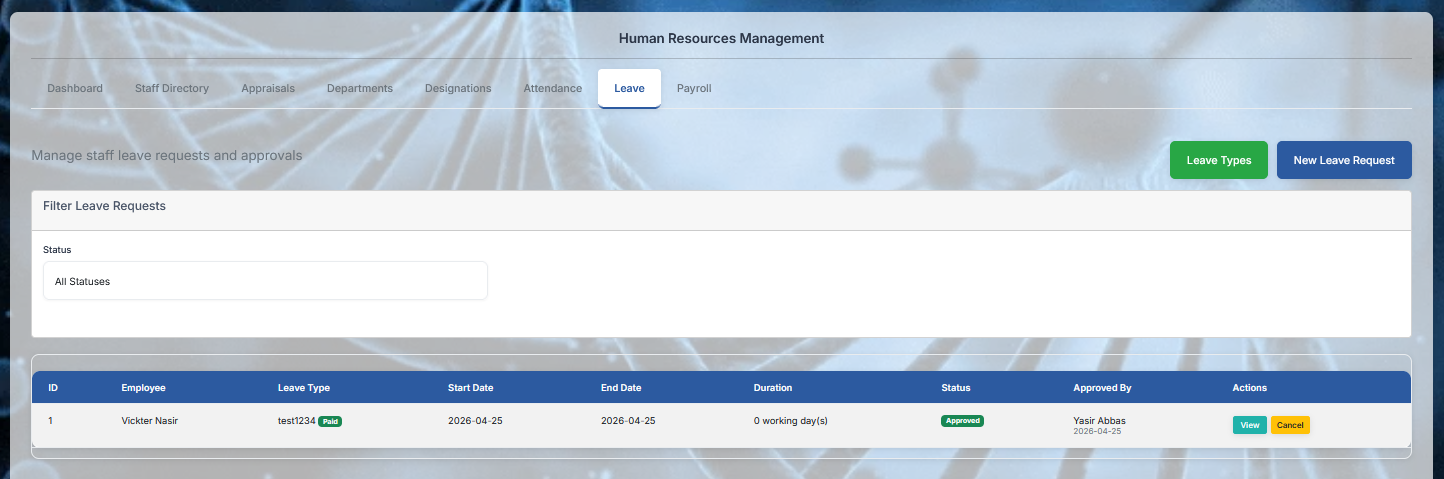
Leave Details
-
Section Title & Sub-Menu: Labeled "Human Resources Management" with the Leave tab actively selected.
-
Horizontal Navigation Links: Upper menu tracking employee workspace modules: Dashboard, Staff Directory, Appraisals, Departments, Designations, Attendance, Leave, and Payroll.
-
Global Configuration Triggers: Far-right upper corner hosts dual operational shortcut buttons:
-
Leave Types: A high-visibility green button to manage corporate leave quota profiles.
-
New Leave Request: A primary solid blue call-to-action button to initiate a manual employee time-off request form.
-
-
Workspace Area Guide Text: Left-aligned instructional sub-heading reading: "Manage staff leave requests and approvals".
-
Filter Requests Panel: Dedicated dropdown sorting block container labeled "Filter Leave Requests" containing a Status selection menu pre-filled with the default tracking value: "All Statuses".
-
Data Table Schema Columns: Relational data grid separating leave tracking metrics parameters:
ID,Employee,Leave Type,Start Date,End Date,Duration,Status,Approved By, and inline workflow handles labeledActions.
Attendance Details
-
Section Title & Tab Navigation: Labeled "Human Resources Management" with the Attendance tab actively selected across the horizontal navigation menu.
-
Global Access Triggers: Top-right actions group hosting functional shortcut controls like "Mark Attendance" (for manual desk logging) and "Biometric Sync" (to fetch logs directly from hardware terminals).
-
Workspace Setup Subtext: Left-aligned operational tracking guide line reading: "Monitor daily staff check-ins, shift timings, and clock logs."
-
Filter Logs Workspace: Features dual calendar query inputs labeled
Date FromandDate Topaired with an ""All Staff"" dropdown selection box and a gray "Filter" button. -
Data Table Schema Columns: Relational grid matrix separating daily attendance parameters:
Log ID,Employee Name,Date,Clock In,Clock Out,Late In (Mins),Total Hours, andStatus. -
Live Operational Logs: Displays real-time device timestamps showing automated tracking labels such as Present, Late, or Absent with calculated work hours strings.
-
Row Micro-Action Controllers: Every logs line item features a teal "View Details" shortcut and an amber "Regularize" override button to manually adjust mismatched punch intervals.
Payroll Details
-
Section Title & Tab Navigation: Labeled "Human Resources Management" with the Payroll tab actively selected to manage workforce monthly compensations.
-
Global Financial Triggers: Far-right upper matrix button group hosting a primary solid blue "Generate Monthly Payroll" pipeline run command alongside an "All Slip Templates" configuration anchor.
-
Workspace Setup Subtext: Left-aligned payroll audit tracking guide line reading: "Process monthly salaries, track structural deductions, and approve compensation slips."
-
Filter Payslips Workspace: Contains a dy